

It’s 4:47 PM on Thursday. Your VP just asked for something visual to anchor tomorrow's board discussion. You have a PRD. You have bullet points. You have 16 hours and no designer availability.
This moment of pressure reveals a gap. We have goals, but we often lack a clear map of the steps required to achieve them. We see the destination, not the terrain.
Task analysis is the art of drawing that map. It’s a method for deconstructing a user’s goal into the smallest possible steps to understand exactly how they do what they do. It’s not about what you think they do. It’s about what they actually do.
The Hidden Steps Behind Every Click
We have a bad habit of seeing user behavior as a single event: a click, a scroll, a bounce. Your analytics show the drop-off, but they can’t tell you why. Was the button copy confusing? Did they need a piece of information that wasn't there?
The basic gist is this: every action is the final move in a hidden sequence of tiny decisions.
Uncovering that sequence is the whole point.
Deconstructing the User's Goal
A user’s goal is not a single action. It’s a chain of dependencies. Think of it like a train schedule. The final arrival time depends on every single departure and connection happening perfectly. One delayed train can cause a cascade of failures. Your product works the same way.
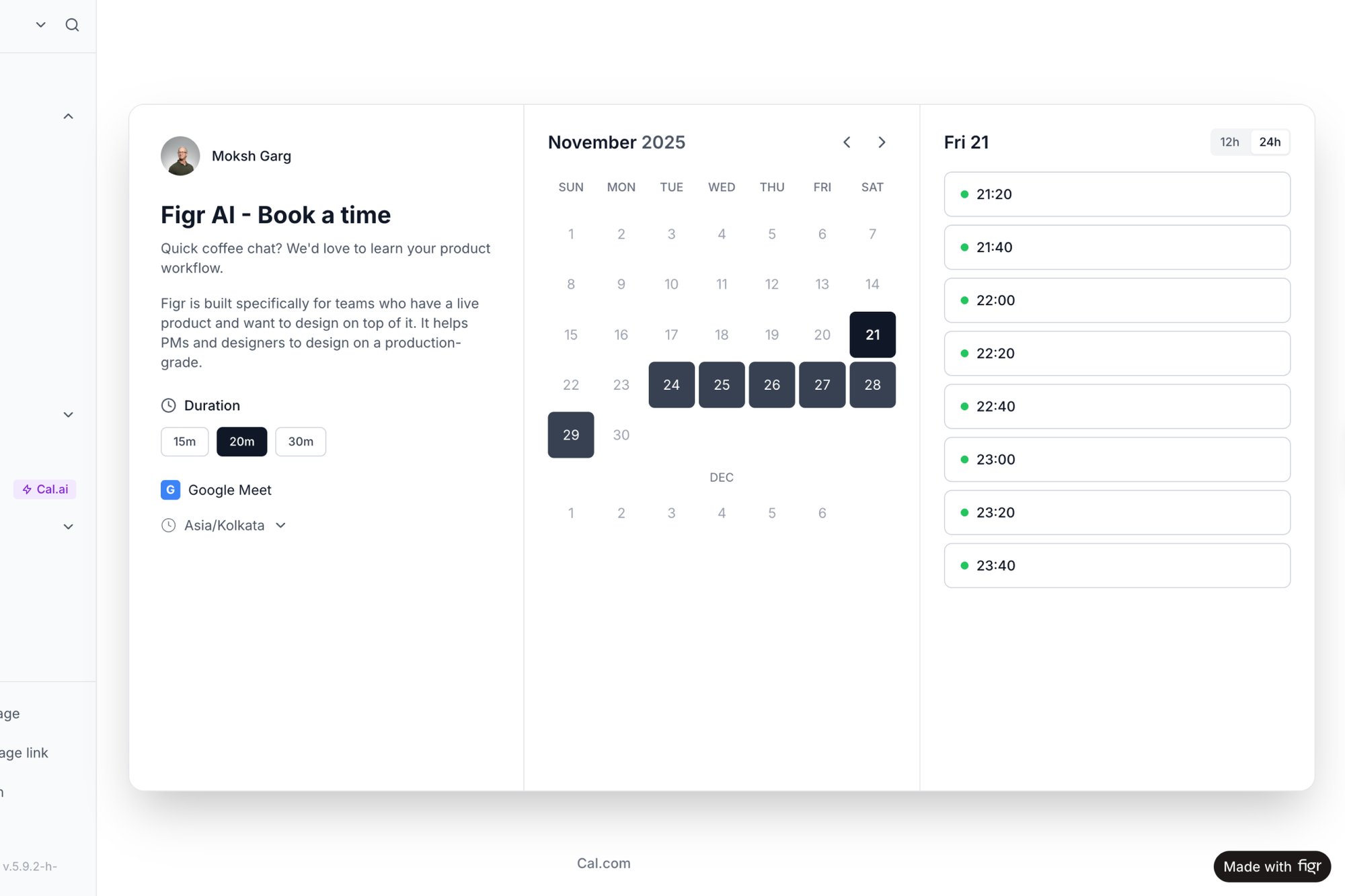
The goal “book a meeting” isn’t one click. It’s a series of smaller tasks:
- Find the scheduling tool.
- Figure out what the time slots mean.
- Convert time zones in their head.
- Enter their details.
- Confirm the appointment.
Each one is a potential point of friction, a place where the connection can be missed. Task analysis is the flashlight you use to illuminate this entire chain. For a deeper dive into visualizing these paths, you can learn more about crafting a user journey map.
From Vague Problems to Specific Actions
Last week, I watched a product manager wrestling with a high drop-off rate on a new feature. The team's dashboard showed that 70% of users who started the setup process never finished. The problem was obvious, but the cause was a total mystery.
By observing a few users, the PM had a breakthrough. The issue wasn't the UI, it was cognitive. Before users could complete step three, they needed a specific piece of information from another part of the app. They were leaving to find it and simply not coming back.
The task analysis revealed a missing ingredient.
The fix wasn't a big redesign. It was a simple link that provided the necessary data at the exact moment it was needed. Seeing the complete flow of steps, as explored in this analysis of the Cal.com scheduling tool, shows exactly where these hidden dependencies lie. Task analysis transforms vague problems into specific, observable user challenges. It moves you from guessing to knowing.
From Factory Floors to Digital Interfaces
Task analysis wasn't born in a design studio. Its roots are loud, greasy, and smell of machine oil. The methodology is a ghost from the early 20th-century assembly line, a system built to find the single most efficient way to tighten a bolt.
Think of it like a choreographer watching a dancer. The goal isn’t just to see the final twirl, but to break down every movement to understand how they connect into a fluid routine. Early industrial engineers did that for factory output, obsessing over physical motions to slash waste and squeeze productivity out of the line.
From Assembly Lines to Lesson Plans
This factory-floor method found an unlikely second home: the classroom. While pioneers like Frank Gilbreth were tinkering with motion studies back in 1911, the modern educational use of task analysis took hold in the 1950s. Teachers realized you could adapt industrial efficiency techniques to teach complex subjects.
The core principle was identical. To master a big skill, you first have to master all the little skills that compose it.
The Logic That Connects a Piston to a Pixel
What does this history have to do with designing an app? Everything. The same logic that optimized a Ford assembly line now builds intuitive software. When we map out a user flow, we are doing the same job as those early efficiency experts, just with clicks instead of cogs.
This is a powerful mental model. It shifts your focus from just shipping features to carefully building a path that guides a user to success. A well-designed task flow, like those explored in our guide to service blueprinting examples, is basically a perfect lesson plan. It anticipates the user’s next question and leads them logically to the finish line. The factory floor taught us that every motion has a cost. That lesson is just as true for every click.
Choosing the Right Lens for Your Analysis
Not all user goals are created equal, and neither are the methods to decode them. Deciding to "do a task analysis" is like a photographer deciding to "take a picture" without choosing a lens. What you see depends entirely on the lens you pick. Do you need the sprawling landscape or the intricate detail on a single leaf?
The evolution from physical to digital shows a consistent theme: breaking down complex actions into understandable parts. The only thing that's changed is what we're breaking down.
The Wide-Angle Lens: Hierarchical Task Analysis (HTA)
Think of Hierarchical Task Analysis (HTA) as your wide-angle lens. It’s perfect for capturing the big picture, the observable, step-by-step sequence a user follows. HTA is all about structure, breaking down a primary task into a pyramid of sub-tasks.
It cleanly answers the question: What is the user doing?
- Goal: Make a peanut butter and jelly sandwich.
- Sub-task 1: Gather ingredients (bread, peanut butter, jelly).
- Sub-task 2: Assemble the sandwich (lay out bread, spread PB, spread jelly).
- Sub-task 3: Finalize the sandwich (combine slices, cut if desired).
- How does the pricing update in real-time?
- What if the driver simply can't accommodate the change?
- Accurate estimates: Your timeline starts reflecting reality, not just optimism.
- Reduced scope creep: The dreaded "what about when..." questions get answered during planning.
- Minimized rework: Fewer surprises for engineers means less rebuilding of poorly specified features.
- The Prerequisite: What does the user need to know before they can confidently take this action? Do they need to see the assignee's workload? The due date? The priority? This uncovers the invisible cognitive load.
- The Feedback: What immediate confirmation tells the user their action worked? Is it a toast notification? A change in the button's state? This defines the system's response that closes the loop.
- The Failure States: What are the three most likely ways this could go wrong? Maybe the assignee doesn’t exist. Perhaps the user lacks permissions. Or the network connection drops.
This method is incredibly useful for documenting existing workflows or designing new ones where the steps are clear and procedural.
The Macro Lens: Cognitive Task Analysis (CTA)
Sometimes, the most critical actions are completely invisible. This is where Cognitive Task Analysis (CTA) comes in. It’s the macro lens, zooming in on the mental gymnastics happening behind the scenes. CTA isn't about the clicks, it’s about the calculations, decisions, and judgments that happen before the click.
When should a pilot decide to abort a landing? That isn't just a procedural checklist; it involves complex mental models. CTA uses methods like structured interviews to get that internal dialogue out in the open. A friend at a fintech startup told me they used CTA to figure out why users weren't adopting their new runway forecasting tool. The analysis revealed the real problem: users didn't trust the algorithm's projections. That insight was gold.
CTA answers a much deeper question: What is the user thinking?
The Documentary Film: Contextual Inquiry
Finally, there’s Contextual Inquiry. This isn't just a lens, it's the whole documentary film crew. You go into the user's natural habitat and watch them work. It combines observation with conversation, letting you see the task as it actually happens, complete with interruptions and chaos.
A task doesn't happen in a vacuum. It happens at 4 PM on a Friday with three browser tabs open and a looming deadline.
This method is less structured, but the qualitative insights are incredibly rich. You might discover that the "perfect" workflow you designed on a clean whiteboard completely falls apart in a messy office. It’s one of the most powerful user research methods for uncovering unmet needs. It answers the most vital question of all: Why are they doing it this way?
Turning Observations Into Actionable Artifacts
Analysis without a tangible output is just an expensive conversation. The real value of task analysis appears when your raw observations are hammered into concrete assets a development team can actually use. This is the bridge from knowing to doing.
This is what I mean: you’re not just watching users, you’re building a blueprint for their success.
From Raw Notes to Structured Flows
The most fundamental artifact is the user flow diagram. It’s a visual map of the path a user takes, charting every decision point and action. When analyzing a process like the Dropbox file upload, the "happy path" is obvious. But a proper task analysis forces you to ask uncomfortable questions. What if the network drops? What if the file is too big? One simple flow explodes into a complex web of potential edge cases, as you can see in this Dropbox file upload flow analysis.
Mapping this visually is the first step toward building a feature that doesn't break under pressure.
Surfacing the Invisible with Edge Case Maps
An edge case map is where you document all the "what ifs" that engineering will run into. Failing to do this is a primary cause of scope creep. A PM I know learned this the hard way. His team shipped a feature to "add a stop mid-trip" for a ridesharing app. They missed dozens of edge cases.
These unanswered questions turned a simple feature into a technical nightmare. A thorough analysis would have generated comprehensive test cases upfront, baking quality in from day one. By mapping every contingency, you turn abstract risks into a concrete checklist. This is how you document business processes to drive team efficiency.
The Economic Impact of Good Artifacts
This isn't just about good design, it's about good economics. Creating these artifacts systematically de-risks development. Every edge case you define in a document is one less "what should happen here?" conversation mid-sprint. It shifts the cost of discovery from the expensive coding phase to the cheap planning phase.
In short, these documents aren't bureaucratic overhead.
They are the tools that translate empathy into code. Your next step is simple. The next time you start a new feature, don't just write the user story. Try to draw the user flow. Then, challenge yourself to find three things that could go wrong. That simple act is the beginning of turning observation into a truly actionable artifact.
Why Task Analysis Is an Economic Advantage
It’s easy to dismiss a user-centric practice like task analysis as something soft. But the line connecting it to your bottom line is brutally direct. It’s the difference between a project that ships on time and one that quietly bleeds the budget dry.
I know a product manager who scoped a feature for two weeks. It ended up taking six.
Why the gap? The initial plan covered the main screen, the "happy path." But a proper task analysis would have immediately flagged the eleven other states, error messages, and confirmation screens needed. That delay wasn't an engineering failure. It was a planning failure, born from an incomplete picture of the user's actual task.
De-Risking Projects Before Code Is Written
This is the zoom-out moment. Task analysis is a powerful economic lever. It systematically de-risks projects by surfacing complexity before any expensive code gets written. Every step and potential failure you identify upfront is a landmine you’ve just defused.
This kind of foresight leads to tangible wins:
By mapping user workflows, teams can also spot opportunities to integrate tools like efficient dictation software, creating advantages beyond the interface itself.
Shifting the Cost of Discovery
Task analysis isn't just about building the right thing; it’s about building it efficiently. It shifts the cost of discovery from the expensive development phase to the cheap planning phase. Finding a problem on a whiteboard costs minutes. Finding that same problem after it’s been coded costs days.
This methodical approach isn't confined to software. In clinical settings, as detailed in Task Analysis in Instructional Design, it's used to support individuals with significant learning challenges. To ensure a skill is mastered, clinicians often require perfect performance across five consecutive trials of a task step. You can read the full research about these clinical applications. The same precision in identifying failure points is what gives product teams their economic edge.
It's time to reframe the conversation. Stop seeing task analysis as a “nice-to-have” UX activity. Start treating it as a core financial strategy.
How to Start Your First Task Analysis
Theory is fine, but clarity comes from doing. How do you get started without trying to boil the ocean? You pick one tiny user action and put it under a microscope.
The next time you write a user story, resist jumping straight to design. Instead, find a single, specific action inside that story. If your feature is "Assign a Task," the core action might be the final click on the "Assign" button.
That one click is your starting point.
The Three Questions for Your First Analysis
With that single action in focus, you don’t need a complex framework. You just need to answer three simple questions.
Here they are:
This simple exercise is the seed of a full task analysis. It forces you to think beyond the click, mapping the context that comes before it and the consequences that come after. By documenting these states, you start to see how a simple button can hide a complex reality, much like in this map showing various states for a task assignment component.
Building a Habit of Deconstruction
Turn this into a habit, and it transforms user stories from vague requirements into detailed specs that kill ambiguity. If you’re interested in the foundational research that comes before this, our guide on conducting primary customer research is the perfect place to start.
The goal isn't massive documentation for every feature.
The goal is to build the instinct for deconstruction, to see every interaction not as a single event, but as a chain of dependencies. So start small. Pick one action. Ask the three questions. What you uncover might surprise you.
Common Questions About Task Analysis
As teams adopt this method, a few questions always surface. They bridge the gap between getting the concept and actually using it. Let’s tackle the most common ones.
How Is Task Analysis Different From a User Journey Map?
Think of it like camera lenses. A user journey map is your wide-angle shot. It captures the entire experience over time, complete with emotional ups and downs. Task analysis is the macro lens. It zooms in on one specific goal within that journey. If the journey is "planning a vacation," a task analysis might focus only on "booking a flight." One gives you the panoramic view, the other gives you the detail needed to design a workflow that just works.
Can I Use Task Analysis for a Product That Does Not Exist Yet?
Absolutely. In fact, this is one of its most powerful uses. You’re not analyzing a hypothetical interface, you’re analyzing the user’s current, often messy, workflow. How do they solve this problem today? Is it a chaotic mix of spreadsheets and sticky notes? By mapping their existing process, you uncover hidden pain points. Your new product’s design becomes a direct answer to real-world problems.
How Many Users Do I Need for a Reliable Task Analysis?
It's almost always fewer than you think. You're not looking for statistical significance, you're hunting for qualitative insights. Patterns, not percentages.
The Nielsen Norman Group famously found that you can uncover around 85% of the usability problems in a task by observing just five users. After about five sessions, you’ll start seeing the same frustrations over and over again. The key is picking the right participants, not just a lot of them.
What Is the Biggest Mistake Teams Make When Starting?
The most common trap is analyzing the system's tasks instead of the user's goals. Teams often slip into mapping how their interface works: "User clicks button A, then modal B appears." That’s a system flow. A real task analysis starts with the user's intent, in their own words: "I need to find and share the quarterly report." The system should bend to their process, not the other way around.
Figr is the AI design agent that helps you move from questions to production-ready artifacts faster. It learns your product’s context to generate user flows, edge cases, test cases, and high-fidelity designs that match your live application. Ship UX with confidence.