

A website UX audit isn't just about spotting friction. It’s a deep dive to find out why that friction is costing you conversions, engagement, and trust. This is not about simple checklists; it's about connecting user frustration directly to your business goals, making the case for UX investment undeniable.
Going Beyond a Simple UX Checklist
Your website is not a static brochure. It’s a living system, a constant negotiation between user expectations and business goals. A proper website UX audit gets this. It’s not a quick list of cosmetic fixes: it's a deep investigation into the subtle pain points that are quietly bleeding your bottom line.
Think of it as an MRI for your digital product.
A basic analytics dashboard shows you the what: a 40% drop-off on your pricing page. That's the symptom. A real audit uncovers the why: the pricing tiers are a mess, the main call-to-action is buried below the fold on mobile, and a slow-loading script is causing rage clicks. It reveals the hidden structural issues a surface-level checkup would miss entirely.
This guide is designed to move you from just observing to actually diagnosing.
From Checklist to Investigation
Too many teams start a UX audit with a checklist. Does the site have a search bar? Check. Are the buttons a consistent color? Check. This is like a doctor asking if you have a fever but ignoring all other symptoms. It’s a starting point, but it misses the whole story.
Sure, you can use a comprehensive user experience audit checklist to make sure you don’t miss the basics. But do not let it be your final destination.
The real value shows up when you treat the audit as an investigation.
This flow gets it right. The checklist is just the gateway. It leads you into a deeper investigation that results in a diagnosis you can actually act on. It’s not a task to finish, it’s a process of discovery.
Diagnosing the Core Problem
Last week, a PM at a B2B SaaS company told me his team spent a month "refreshing" their homepage. They updated visuals and tweaked copy. The result? A paltry 0.5% lift in demo requests. Their audit was a checklist of aesthetic tweaks. They never diagnosed the real issue.
A proper audit would have found the core problem in a day: visitors had no idea what the product actually did. The value proposition was buried. The problem wasn't the button color; it was a fundamental lack of clarity. For more on the principles that drive this kind of clarity, see our guide on good interface design.
The purpose of a website UX audit isn't to find things to fix. It's to find the right things to fix, the ones that unlock the most value for both the user and the business.
This shift in perspective is everything.
It reframes the audit from a cost center focused on cleanup to a strategic initiative focused on growth. It’s about zeroing in on the specific user journeys where friction is highest and the business impact is greatest.
So here's the takeaway: Stop auditing your website like it's a list of chores. Start diagnosing it like it’s your most critical system for growth. That’s how you get results that actually move the needle.
How to Frame Your Audit for Business Impact
A UX audit without a clear goal is just a glorified bug hunt. It generates activity, sure, a flurry of reports and a backlog of tickets, but it drifts. It becomes a collection of opinions, not a tool for business growth.
Before you touch a single pixel or analyze a single screen, you have to define what winning looks like. The sharper the goal, the more potent the audit.
Here is what I mean. A fuzzy goal like “improve the homepage” invites endless debates about colors and copy. A sharp goal like “increase clicks on the primary CTA from the homepage by 15% in Q3” gives you a target. It reframes the audit from a subjective design project into a core business initiative.
Aligning UX Goals with Business KPIs
Your audit does not exist in a vacuum. To get buy-in and a budget, you have to speak the language of the people who write the checks. That means connecting your UX work directly to the metrics other departments live and die by.
Think about what the rest of the business actually wants.
- Sales: They need higher quality leads and shorter sales cycles. Your audit could focus on ripping the friction out of the demo request form to improve lead qualification.
- Marketing: They're measured on conversion rates and bounce rates. An audit might trace the user journey from an ad click to a sign-up, plugging the leaks along the way.
- Support: They want fewer tickets for the same damn problems. A targeted audit could dissect the user flow that floods their queue, like a confusing billing section.
- Product: Their world revolves around user retention and feature adoption. Your audit could examine the first-time user experience or the path to discovering a key feature.
I once watched a PM get shot down when he asked for resources to do a “UX cleanup.” He went back and reframed his pitch: “An audit of our onboarding will reduce first-week churn by 10%. We project that will increase ARR by $200k.”
The project was approved the next day. He tied a user goal to a business outcome. That’s the entire game.
The Power of a Baseline
Want to prove your work made a difference? You need a "before" picture. This baseline is your single most powerful tool for showing impact. It’s the hard evidence that separates your contribution from wishful thinking.
Gathering this data is not rocket science. Just use your existing analytics to capture the current state of whatever flow you plan to audit.
Your baseline isn't just data; it's the starting point of your story. It sets the stage for the transformation you're about to create, making the final results undeniable.
Let's say you're auditing a checkout flow. Before you start, you absolutely must document:
- The current cart abandonment rate.
- The average time it takes a user to complete a purchase.
- The specific drop-off rate at each step of the funnel.
This data is not just for the victory lap at the end. It sharpens your focus during the audit itself. A 40% drop-off at the payment step tells you exactly where to dig in. Knowing where the problem is hiding is half the battle. You can learn more about how to connect these findings to financial outcomes in our guide to calculating UX ROI.
When you frame your audit around specific, measurable goals and lock in a clear baseline, you do more than just find problems. You build a bulletproof case for change that gets everyone, from engineering to the C-suite, on board.
Finding the Story Hidden in Your Analytics
Your analytics platform is quietly watching everything. Every click, every hesitation, every scroll. It's a goldmine of user behavior, but you're going to have to do the digging yourself. The goal here is not to admire vanity metrics like page views. It's about finding the hard, quantitative proof of where your experience is failing.
Think of yourself as a detective. You have just arrived at the scene, and the numbers are your only clues. They will not tell you the why, but they will point you exactly where the struggle happened.
From Data Points to Story Points
I have a friend whose Series C company saw a 40% drop-off right after launching a new checkout flow. The analytics dashboard was a giant red flag, but it could not explain why users were vanishing. It only showed where. That page was the X marking the spot.
This is the whole point of the quantitative analysis phase. You're not looking for answers. Not yet. You're looking for much better questions.
Your investigation should zero in on a few critical areas:
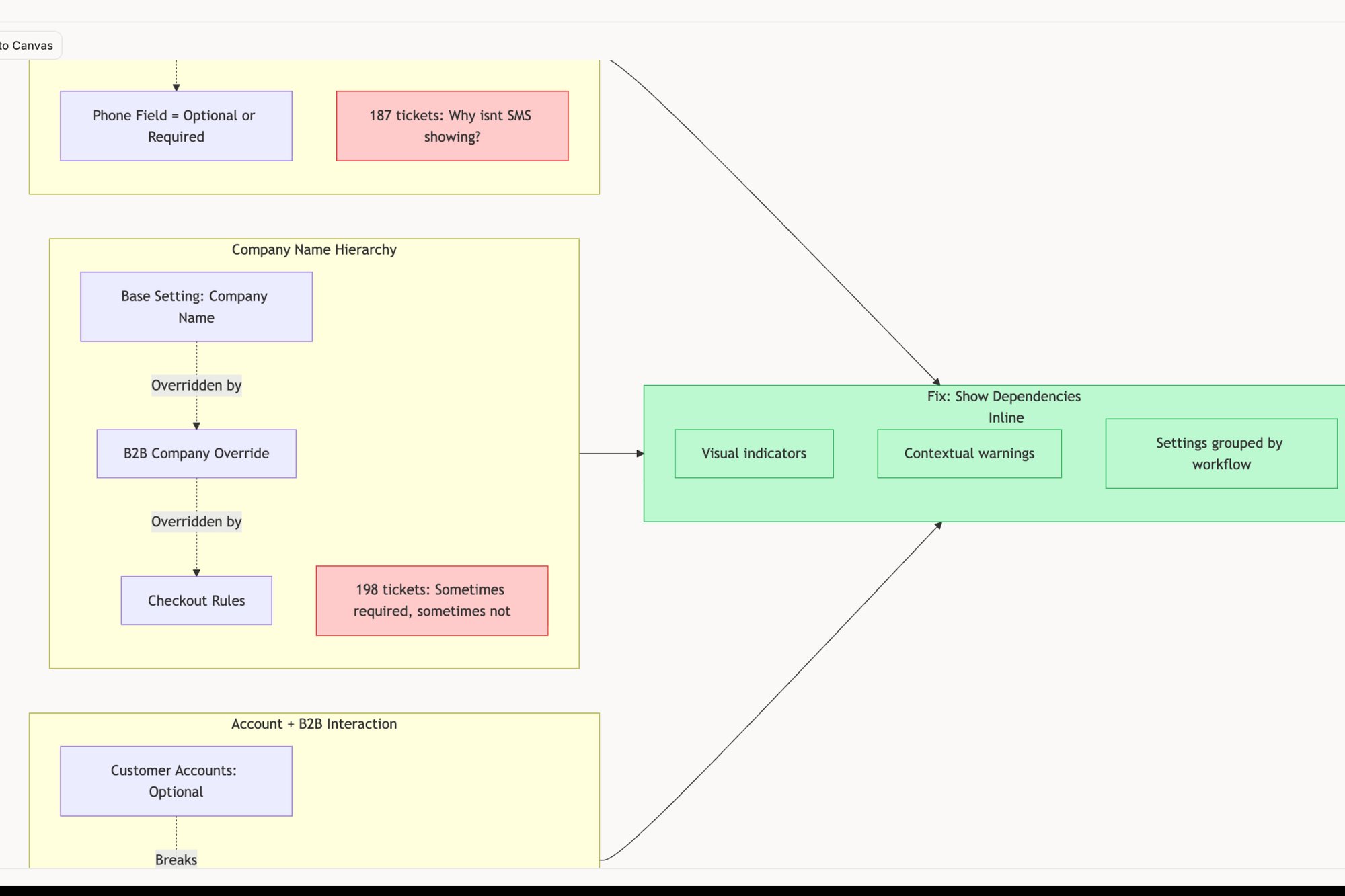
- Conversion Funnels: Where are people abandoning your most important flows? I’m talking about signup, checkout, or onboarding. A sudden drop is a signal, like in this redesigned Shopify checkout setup flow that aims to reduce such drops.
- User Segments: Are new users from that expensive ad campaign bouncing more than your organic traffic? Does your site fall apart for people using a specific browser or device?
- Exit Pages: What’s the last thing people see before they leave? A high exit rate on your homepage might be normal. A high exit rate on the second step of your payment process is a five-alarm fire.
See what I mean? The data tells a story of user struggle. Your job is to listen and pinpoint the exact scene of the crime.
Formulating Testable Hypotheses
Once the numbers have pointed you to a problem, you can start forming hypotheses. A good hypothesis is a bridge from the what (the data) to the why (the potential UX failure).
Let's go back to that checkout flow. The team saw the 40% drop-off on the page where users enter their shipping info. That location gave them a starting point, so they came up with a few sharp hypotheses to investigate:
- Hypothesis 1: The form is just too long, and people are getting fatigued.
- Hypothesis 2: The address validation is overzealous and incorrectly flagging valid addresses.
- Hypothesis 3: Unexpected shipping costs pop up on this step, leading to sticker shock.
Each of these is a specific, testable idea. They can be proven or disproven with the qualitative research that comes next. This is how you take a vague problem like "checkout is broken" and turn it into a solvable mystery. To dig deeper into this process, have a look at our guide on product analytics tools that can seriously speed up finding these insights.
According to Baymard Institute, the average cart abandonment rate is nearly 70%. A huge chunk of that comes from a complicated checkout process, an issue that analytics can spot in a heartbeat.
That statistic is not just an abstract number; it's the direct financial cost of friction. Every single percentage point you can reclaim from that abandonment rate is pure revenue. This is what data-driven detective work is all about.
This deep dive into your analytics sets the stage for everything that follows. It gives you the focus you need for user testing and heuristic evaluation, making sure you do not waste time investigating parts of the experience that are working just fine. It grounds your entire website UX audit in hard evidence.
Uncovering Why Users Struggle with Qualitative Insights
Analytics tell you what is happening. Qualitative insights are where you find out why. This is the real meat of a UX audit. It’s where cold numbers transform into human stories of frustration, confusion, and sometimes, unexpected delight.
Think of it this way: your quantitative data is the map showing you a traffic jam on a specific page. But qualitative feedback is like getting a call from someone who actually lives on that street. They can tell you exactly why the jam happens every day: a poorly timed pop-up, a confusing icon, or a button that doesn’t look like a button.
Numbers tell you there’s a problem. People show you its face.
The Power of Watching Someone Struggle
I once sat in on a user test where a product manager was observing. The user, a smart person who perfectly matched the target persona, spent five agonizing minutes trying to find the ‘Settings’ menu. It was right there in the main nav, but we’d used an obscure icon that meant nothing to them.
That single moment of witnessed struggle was more powerful than any chart showing high exit rates on that page. It created an immediate, visceral understanding. The PM did not need a report to be convinced; he felt the user's frustration.
This is the entire point of qualitative work: building empathy that forces action. It's not about collecting opinions. It's about observing behavior.
Running a Heuristic Evaluation
One of the fastest ways to start gathering qualitative feedback is with a heuristic evaluation. This isn't just you clicking around and sharing your gut feelings. It’s a structured review where you check an interface against a set of established usability principles. For example, a UX audit comparing Jira and Linear would apply these heuristics to real-world task creation.
The most famous set comes from Jakob Nielsen. His 10 usability heuristics have been a cornerstone of UX for decades, giving you a lens to spot common issues with consistency, error prevention, and user control.
For example, when you’re evaluating your site for “Consistency and standards,” you ask pointed questions:
- Do our buttons and links look and behave the same way everywhere?
- Is our terminology consistent, or do we call the same thing two different names?
When you find a violation, you don't just note it. You document the specific screen, the principle it breaks, and the potential impact on the user. For a deeper dive on these methods, this guide on what is qualitative analysis offers a solid foundation.
Moderated User Testing
While a heuristic evaluation is a great starting point, nothing, and I mean nothing, replaces watching real people use your product. Moderated user testing involves recruiting a small handful of representative users and watching them complete specific tasks on your site.
The key is to create realistic scenarios. Don't tell them, "Find the pricing page." That’s a test of their ability to follow instructions.
Instead, frame it like this: "Imagine you're considering our product for your team. Show me how you would figure out how much it costs."
As they work through it, your job is to stay quiet and observe. Only prompt them with open-ended questions like, "What are you thinking right now?" or "What did you expect to happen there?".
To get even deeper, tools like Hotjar can give you a window into how users behave when you’re not there, through heatmaps and session recordings. Documenting these findings is what turns observation into action.
This is how you get past your own assumptions and find the ground truth. The blend of expert evaluation and direct user observation is what gives a UX audit its real power, turning abstract problems into solvable, human-centered challenges.
Turning Your Findings Into an Actionable Roadmap
An audit’s value isn't in the stack of findings. It’s in the work that gets shipped. A fifty-page report that no one reads is a failure. Its insights are just interesting trivia until they are translated into a concrete plan.
This is where you build the bridge from analysis to execution.
Prioritize with the Effort vs. Impact Matrix
Your audit will uncover dozens, maybe hundreds, of issues. They will range from tiny copy tweaks to a complete overhaul of your navigation. Trying to fix everything at once is a recipe for paralysis. You need a system.
The most effective tool I’ve found is often the simplest: the effort vs. impact matrix. Think of it as a lens that brings your chaotic list of findings into sharp focus. Each finding gets plotted on a grid with two axes:
- Impact: How much will this change improve the user experience or move a key business metric?
- Effort: How much time and how many resources (design, engineering, content) will this take to implement?
This simple act of sorting forces clarity. It separates the trivial from the critical and organizes your work into four distinct buckets: Quick Wins, Major Projects, Fill-ins, and Time Sinks. Your first move should always be the Quick Wins.
The basic gist is this: focus on high-impact, low-effort changes first. These early victories build momentum, demonstrate the audit's value, and earn you the political capital needed to tackle bigger projects later.
Create Deliverables for Different Audiences
A single, monolithic audit report is a document destined for a digital drawer, unread. Your CEO and your lead engineer care about very different things. The real key to getting things done is to create different deliverables for different people.
A finding isn’t truly documented until it’s understandable and actionable for the person who needs to implement the fix. Your job is to translate, not just report.
For leadership, you need a concise executive summary. This should be a one-to-two-page document. Highlight the top three to five critical findings, their direct business impact (e.g., lost revenue, churn risk), and the recommended roadmap. No jargon. Just the bottom line.
For product managers, you deliver prioritized recommendations. This is not a vague wish list. It’s a set of user stories or problem statements, complete with the supporting evidence from your audit. It gives them exactly what they need to start grooming the backlog.
For engineers and QA, you need maximum detail. A recommendation like "fix the checkout form" is useless. Instead, you provide granular test cases that leave no room for ambiguity. For a complex flow, you might document all possible outcomes, much like these test cases for modifying a trip in Waymo, ensuring total clarity. Another great example is mapping the various states for a simple component, like this task assignment prototype.
This targeted approach means every stakeholder gets what they need without being buried in irrelevant information. This is how you translate insight into execution.
The urgency for this is real. A shocking number of sites fail basic usability tests. Yet the payoff for fixing these issues is massive. As the evolution of website audits shows, businesses that systematically improve their sites see significant returns.
In short, a well-executed UX audit provides a clear path to capturing this value. It's not just about finding problems; it's about shipping fixes that matter.
Common Questions (and Straight Answers) About UX Audits
Even with a solid playbook, a UX audit can feel a bit fuzzy. Questions always pop up. (They should.) Getting straight answers on timing, priorities, and scope is what separates a vague "health check" from a project that actually drives growth.
How Often Should We Run a UX Audit?
There's no magic number. But a good rhythm is one comprehensive audit per year, with smaller, targeted checks every quarter or after a big feature launch.
Think of it like car maintenance. You get the big inspection once a year, but you're checking the oil and tire pressure more often.
For high-traffic e-commerce or SaaS products, should you aim for continuous monitoring of your most critical user flows? Yes, because money is on the line. Catching a tiny friction point in a checkout flow early can save you thousands in lost revenue in a single quarter. It’s about moving from a reactive mode, fixing what’s loudly broken, to a proactive culture of constant improvement.
What Are the Most Damaging UX Issues?
After doing this for years, you start to see the same villains show up again and again. These are the ones that do the most damage.
First, confusing navigation and a messy information architecture. If people cannot find what they’re looking for, literally nothing else on your site matters. It's the original sin of bad UX.
Second is inconsistent design. When buttons, forms, and links look and act differently from one page to the next, you’re making the user's brain work way too hard. They have to re-learn your site with every click, and that kills trust and patience fast.
Third, and this is a big one now, is slow performance tied to Core Web Vitals. Research from places like the Baymard Institute proves it over and over: slow pages are a direct barrier to conversion, especially on mobile. Which brings up the fourth killer, a bad mobile experience. If your site is not designed for mobile, it's designed to fail for more than half your audience.
How Do I Justify the Cost and Time to Stakeholders?
You speak their language. That language is money and metrics.
Never pitch the audit as a “design health checkup.” That sounds like a cost. Instead, frame it as a “revenue optimization initiative” or a “churn reduction project.”
The trick is to connect a specific UX problem to a real business number using your own analytics.
For example, don't say this: "We need to audit the sign-up form because it's confusing."
Say this instead: "Our analytics show a 60% drop-off on the sign-up form. We think a targeted audit can find the friction points. If we can increase the completion rate by just 10%, we’re looking at an extra $50,000 in ARR this quarter."
The takeaway is this: present the audit not as a cost, but as an investment with a specific, measurable, and forecasted return.
What’s the Difference Between a UX Audit and an Accessibility Audit?
This is a critical distinction. A website ux audit looks at the whole experience, usability, clarity, goal completion, for the "average" user. It’s a broad-spectrum analysis.
An accessibility audit is a specialized deep-dive. Its sole focus is ensuring people with disabilities can use your website effectively.
While any good UX audit should have a chapter on accessibility basics, a full accessibility audit is far more rigorous. It involves testing against specific legal standards like the Web Content Accessibility Guidelines (WCAG).
You can see an example of a focused accessibility audit report in this review of Skyscanner for elder-friendliness. They’re related, but not the same. One is wide; the other is deep.
A website UX audit grounds your product decisions in evidence, not opinion. Instead of starting from a blank canvas and guessing, Figr learns your live app, design system, and analytics to generate artifacts that are already in context. It helps you map user flows, find edge cases, and create test cases that reflect your actual product, letting you move from insight to action in hours, not weeks. Discover how Figr can accelerate your next UX audit.