

It’s 4:47 PM on Thursday. Your VP just asked for something visual to anchor tomorrow's board discussion. You have a PRD. You have bullet points. You have 16 hours and no designer availability.
That neat UX process diagram you have pinned to the wall feels a little naive right now. It promised a clear path, but you're lost in a fog of conflicting priorities.
This is the reality for most product teams. The process isn't a conveyor belt chugging steadily forward. It's more like a switchboard, where you plug into different modes: discovery, design, delivery, depending on the signals you're getting.
Deconstructing The Linear Myth
The classic view of the UX design process steps suggests a clean, predictable flow: research, then design, then ship. Simple, right? Except product development is never that tidy. New data rolls in. The market zigs when you expected it to zag. A key assumption gets completely invalidated during a single user test.
A linear map is useless when the territory itself keeps changing.
To really navigate this landscape, you have to understand what is user experience design at its core. It’s not just about making things look good; it’s a strategic discipline for reducing uncertainty. The trick is to see the process not as a checklist but as a toolkit. The main phases, Discovery, Design, and Delivery, aren't just sequential stages. They're mindsets.
- Discovery Mode: You’re asking "why?" and "for whom?" You're a detective, gathering clues and looking for the real story.
- Design Mode: You’re asking "how might we solve this?" You're an architect, sketching out blueprints and exploring possibilities.
- Delivery Mode: You’re asking "did this work?" You're a scientist, running an experiment and measuring the results.
This visual helps show how these modes play off each other.
The key takeaway is that you can, and should, move between these phases fluidly. It's not a one-way trip. The process is only as good as the principles guiding it. For the foundational heuristics and design philosophies, see our guide on UX design principles.
A Framework Born From Experience
This structured approach has deep roots. The field took a huge leap forward in the 1990s when cognitive scientist Don Norman, then at Apple, first coined the term 'user experience.' This simple phrase marked a massive shift from just thinking about usability to considering a person's entire interaction with a product.
As detailed in The Design of Everyday Things, Norman helped formalize the process we still use today: start with deep user research, sketch interaction frameworks, iterate with prototypes, and test everything rigorously. The value is undeniable, early testing can slash usability issues by as much as 85%.
The rest of this guide is built on that solid foundation. We're going to take a practical look at how to master these modes, moving between them with intention, not panic. We’ll explore each phase not as a step to be checked off, but as a craft to be honed.
Finding Your Bearings With Research And Discovery
Before you draw a single screen, you need to know where you are. More importantly, you need to know where you're going. This initial phase of any UX design process isn't about finding answers. It’s about finding the right questions.
Think of yourself as a navigator charting a new course. The journey doesn’t start with grabbing the tiller and hoping for the best. It begins with consulting your instruments. Your compass is user research, giving you the qualitative direction of human needs. Your telescope is market and data analysis, showing you the quantitative landscape ahead.
Without these, you're just sailing blind.
The Ghost Of Unwanted Features
Last week I watched a PM at a Series C company demo a new analytics dashboard. He was brilliant but impatient. Convinced he understood the customer's pain perfectly, he had skipped formal research. He drove the team to build a beautiful, intricate feature with dynamic charts and customizable reports.
Two months later, the usage data came back. Flat. Almost no one was using it.
Why? The team had built a powerful tool for a problem that, it turned out, only a handful of their customers actually had. They had perfectly engineered a solution for a ghost. The economic fallout was real: three months of engineering time, design effort, and QA cycles were vaporized on something that created zero value.
They had built a faster horse when their users were quietly wondering about cars. This is exactly what the discovery phase is meant to prevent.
Gathering Your Intelligence
So how do you avoid this trap? You become an intelligence agent, gathering information from multiple sources to build a complete picture of the problem space.
Your primary methods in this phase are:
- Jobs-to-be-Done (JTBD) Interviews: This isn't about asking users what features they want. It's about understanding the "job" they are "hiring" your product to do. People don't just buy products; they hire them to make progress in their lives. What progress are they trying to make?
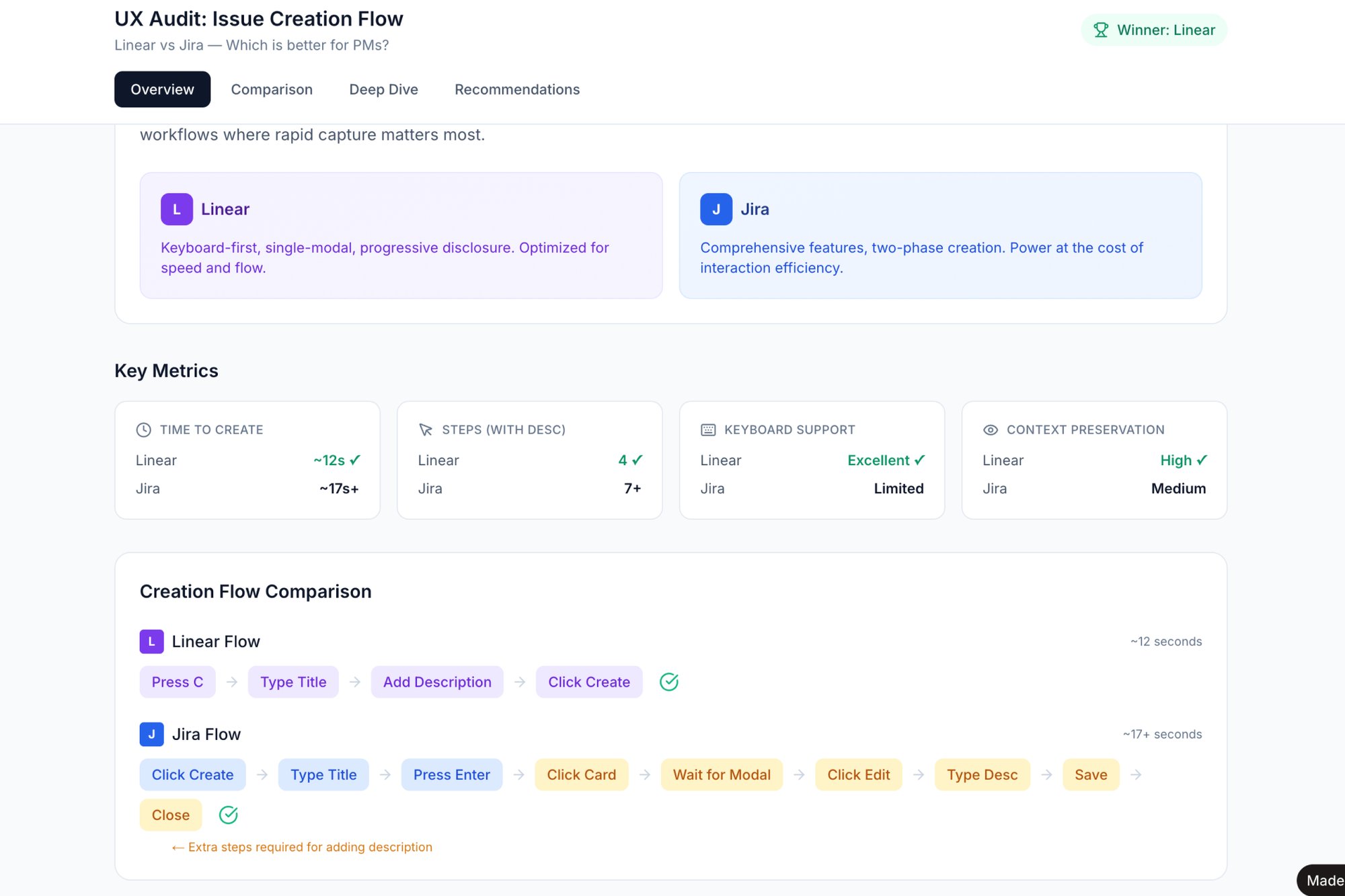
- Competitive Analysis: You need to know how others are attempting to solve this same problem. This isn’t about copying features, it's about mapping the existing landscape to find gaps and opportunities. It’s also about understanding user expectations. For instance, you could quickly compare the task creation flows in tools like Linear and Jira to see where friction exists.
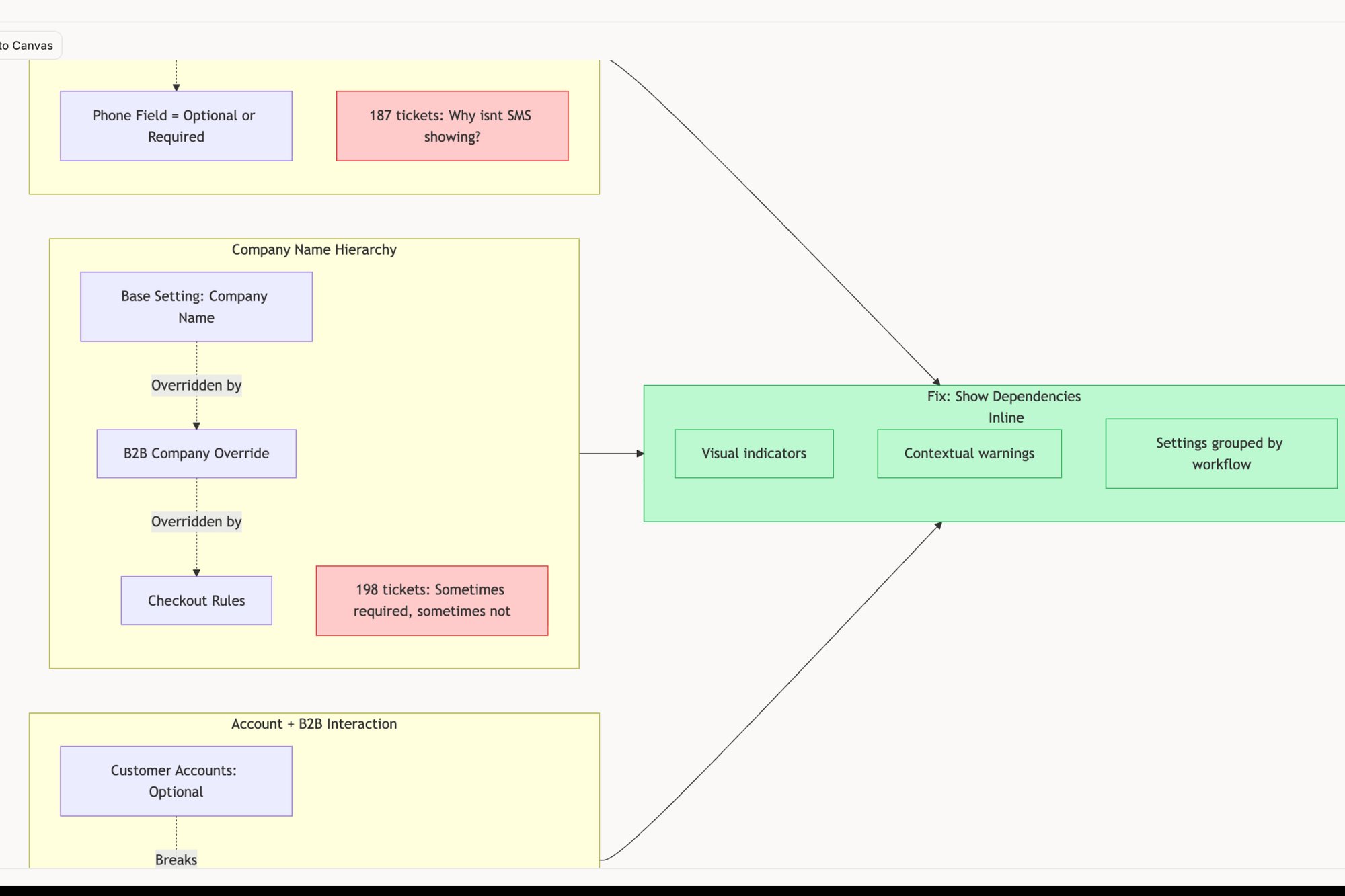
- Analytics Deep Dives: Your existing product is a goldmine of behavioral data. Where are users dropping off? What paths do they take most often? Analyzing a complex funnel, like the one in this redesigned Shopify checkout setup, can reveal exactly where the current experience is failing. This gives you a concrete starting point.
These different inputs paint a multi-dimensional picture. To explore more techniques, check out our detailed guide on user research methods that can help you get started.
The goal of discovery is not to achieve consensus. It's to build a shared, evidence-based understanding of the problem. Clarity is the output, not agreement.
This is a critical distinction. You aren't trying to make everyone happy with the direction. You are trying to get everyone to agree on the map of the current reality. Once you have that map, you can start charting the course.
Forging Messy Insights Into A Clear Direction
The discovery phase always ends the same way: with a mountain of raw material. You're swimming in interview transcripts, analytics reports, competitor teardowns, and a chaotic flurry of sticky notes. This isn't clarity. It’s a mess.
The next, and arguably most critical, step is to apply heat and pressure to that chaos until something sharp, strong, and useful emerges. This is synthesis.
Think of it like a blacksmith forging a blade. You start with disparate chunks of iron ore, seemingly unrelated data points, and heat them in the forge of analysis. You hammer them on the anvil of collaboration. Each strike, whether it's an affinity mapping session or a debate over a surprising quote, burns away the noise and fuses the important bits into a coherent whole.
The goal isn't just to organize information. It's to transform it into a point of view.
From Observation to Archetype
This transformation is most obvious when you define your user. A generic persona like "Marketing Mary, age 35" is dull ore; it's a list of demographics that tells you nothing about why she does what she does. A true archetype, forged from real observation, is a sharpened blade.
Instead of "Mary," you might identify "The Cautious Optimizer." This isn't just a clever label; it’s a behavioral pattern you saw again and again in your interviews. The Cautious Optimizer is that person who triple-checks every setting before saving, who reads every single tooltip, and whose deepest fear is making an irreversible mistake.
Suddenly, you aren't designing for an age bracket. You're designing for an observable mindset.
And that changes everything.
The whole point is to translate messy human behavior into actionable design artifacts.
- User Archetypes: Distill common behaviors, goals, and frustrations into memorable characters that keep the team grounded.
- Journey Maps: Visualize the user's current process, pinpointing their emotional highs and lows. To go deeper, learn more about how to create an effective user journey map in our guide.
- Problem Statements: Frame the core issue clearly and concisely. A solid formula is: "[User Archetype] needs a way to [achieve a goal] because [of a core frustration]."
The Zoom-Out Moment: Why Ambiguity is Expensive
This is what I mean: why does this intense synthesis matter so much? Because ambiguity is expensive. A poorly defined problem is one of the single most costly mistakes a product team can make. A vague problem statement leads to endless, unfocused ideation. That leads to wandering design explorations, which leads to engineers building the wrong thing.
According to a report from Stripe, developer inefficiency costs companies over $300 billion a year globally. A huge driver of that waste is unclear goals and shifting priorities.
Wasted engineering cycles are almost always a direct result of failed synthesis.
Every hour spent refining a problem statement here saves ten hours of rework in development later. The leverage is immense.
I recently saw a team try to "improve the recruiter experience" on their platform. It’s a noble goal, but it's a wish, not a problem statement. After weeks of spinning their wheels, they finally mapped the entire LinkedIn Recruiter Flow. The map made the real problems painfully obvious: drop-off rates were highest during the initial job posting setup, and screening candidates took twelve clicks when it could have taken three.
Suddenly, they weren't just "improving the experience." They were solving two specific, measurable problems. That’s the power of this phase. Your job isn't just to make sense of the data; it's to build a shared understanding so clear it becomes undeniable.
Building The Scaffolding: From Flows to Prototypes
Once you’ve wrestled your research into a sharp strategy, it’s time to stop talking and start building. This is where abstract ideas get their first taste of reality. We’re not picking fonts or fussing over pixel-perfect layouts yet. Instead, we’re building the architectural scaffolding with user flows and prototypes.
You wouldn't pour a concrete foundation without a blueprint. So why would you ever start coding a product without one?
This phase is all about translating the why from our research into a tangible how a user will navigate the experience. The goal isn't perfection; it's about making something just real enough to break our own assumptions before a single line of code is written.
From Lines on a Page to an Interactive Reality
The journey from a vague concept to something you can actually test follows a clear path of increasing detail. It almost always starts with simple lines and boxes. This first step is the user flow, the absolute skeleton of your feature. It forces you to think through the sequence of screens a user will navigate and account for every single decision point along the way. If you're new to them, check out these great user flow examples to see how this simple act can untangle even the most complex interactions.
With a flow locked down, you can start creating something interactive. This is where you learn how to build a prototype of a product. Even a rough, low-fidelity prototype that people can click through moves you from a static map to a dynamic experience. It might feel crude, but this is often where the first big, glaring flaws in your logic jump out. Curious readers can see a high-fidelity example of a prototype that simulates all the edge cases for a Wise card freeze flow.
The Hidden Work: Mapping Every State
Last quarter, a PM at a fintech company shipped a file upload feature. Engineering estimated 2 weeks. It took 6. Why? The PM specified one screen. Engineering discovered 11 additional states during development. Each state required design decisions. Each decision required PM input. The 2-week estimate assumed one screen. The 6-week reality was 12 screens plus 4 rounds of 'what should happen when...' conversations.
This is the stuff that separates a frustrating product from an intuitive one: mapping all the unhappy paths and edge cases.
Every single interactive element in your UI is a small state machine. Failing to map out these states is one of the biggest, and most avoidable, causes of scope creep and developer frustration.
It's not just a design exercise; it's a critical risk-reduction strategy. It turns implicit assumptions into an explicit, visual contract between design and engineering, like this detailed map of Dropbox file upload failure states.
Why This Scaffolding Saves You Later
Thinking in flows and states forces a level of discipline that prevents hugely expensive mistakes down the road. It's not just a feeling; the data backs this up. A study by the Systems Sciences Institute at IBM found that the cost to fix an error found after product release was four to five times as much as one uncovered during design. If that same error makes it into the maintenance phase, the cost can be up to 100 times more.
Every edge case you define here is a future fire you've just prevented.
This phase is where you build confidence. You create low-cost artifacts that let you fail quickly and cheaply. Each flow diagram clarifies logic. Each wireframe tests navigation. Each prototype validates the interaction model. The final structure becomes far more resilient when it finally meets the real world.
Connecting Your Design To Reality
This is the collision. It's the moment your clean, logical design meets the messy, unpredictable reality of a human mind. This phase of the UX design process is all about validation through user testing and the critical handoff to engineering.
But this isn't a relay race where one person passes a baton to the next.
It's a handshake: a pact between design and development to build something real.
Testing for Comprehension, Not Just Completion
Usability testing is often treated like a final exam for the interface. Can the user complete Task A? Did they click the right buttons in the right order? Check the box, ship the feature. This approach misses the most important question: did the user actually understand what they were doing and why it mattered?
A friend at a fintech company recently told me about a new tool they shipped for managing recurring investments. In usability tests, it was perfect, a 100% task completion rate. Everyone could set up a recurring payment. But three months after launch, churn in that user segment had actually increased.
The basic gist is this: users could complete the task, but they didn't trust the tool. They clicked the right buttons, but they didn't comprehend the value or feel secure in the outcome. They could use it, but they couldn't trust it. Effective testing goes beyond the click path to probe for confidence, clarity, and trust.
The Art of a High-Signal Handoff
Once your design is validated, the handshake with engineering begins. A poor handoff is one of the most common points of failure in the entire process. It's where ambiguity turns into bugs and assumptions become rework. The goal isn't just to deliver mockups. It's to deliver a complete package of understanding that anticipates engineering’s questions before they even have to ask them.
A truly great handoff includes artifacts that map out the entire system, not just the happy path. What happens when the network fails? What if the user uploads the wrong file type? Or a file that’s too large? These aren't edge cases; they are the inevitable realities of building software. For more on this, you can learn how to automate the designer-to-developer handoff to make this process smoother.
A well-documented map of every failure state, loading state, and empty state is not a 'nice-to-have.' It is the difference between a two-week estimate and a six-week reality.
Thinking through these scenarios upfront is an act of deep respect for your engineering counterparts' time and intellect. It transforms the handoff from a simple transfer of assets into a shared strategy session.
A Grounded Takeaway
Your next step is simple but powerful. Before you hand off your next feature, don't just share the final designs. Create a dedicated artifact that maps every possible failure state, like this incredible Zoom Network Resilience map covering everything from packet loss to reconnection loops. This single document will save countless hours of clarification down the line.
This rigorous preparation is what connects your design to the physical reality of code. It ensures that what you imagined is what ultimately gets built, robustly and without surprises.
Closing The Loop And Starting Again
Shipping isn't the finish line. It’s the starting gun for the next lap.
This final stage is all about closing the loop, turning the live product you just launched into a perpetual research tool. The goal here isn't to achieve some static, "perfect" design. It's to build a system for continuous learning.
Every piece of data you collect after launch is raw material for your next discovery phase. Are users adopting the new feature? Where are they getting stuck? Which cohorts are converting at higher rates? These aren't just success metrics; they are questions pointing you toward your next move.
This is how the design process transforms from a finite project into an engine.
Building The Learning Engine
Modern product development is fundamentally iterative. The classic double-diamond model of the early 2000s gave us structure, but agile demanded speed.
This pressure led to frameworks like Jeff Gothelf’s Lean UX, which wove continuous user feedback tightly into the cycle. Then came Google Ventures’ Design Sprint, which proved you could compress validation into just five days. Both models proved the same thing: the fastest way to learn is to ship. You can dig into this evolution of the UX process on UX Planet.
The real work after launch boils down to a few key activities:
- Define Key Metrics: Get past vanity metrics like sign-ups. Focus on activation (did they experience the core value?), engagement (are they coming back?), and retention (are they staying?).
- Monitor Behavior: Use analytics to watch what users do, not just what they say they do. A funnel analysis can pinpoint the exact moment of friction in a critical flow.
- Collect Qualitative Feedback: Analytics tell you what is happening. Surveys, support tickets, and follow-up interviews tell you why.
Your Next First Step
In short, the cycle never truly ends. It just gets smarter.
The best way to kickstart this loop is with a single, focused action. Don't try to boil the ocean. Pick one critical, high-traffic user flow in your current product. It could be onboarding, a core task, or even the cancellation flow.
Capture that entire flow and run a quick heuristic or accessibility review. A tool can help map out the existing experience and ground your analysis, like this analysis of the Skyscanner flight search.
This one action will almost certainly uncover immediate, high-impact opportunities for improvement.
It gives you a tangible starting point for your next design sprint, grounding it in reality, not just assumptions.
Frequently Asked Questions
You’re in a planning meeting. It’s 10:17 AM, and a junior PM asks the question that makes everyone pause: “But if we follow all these UX design process steps, won't it just slow us down?”
It’s a fair question. It gets right to the heart of the tension between moving fast and moving smart. But the truth is, a solid process isn't about adding steps, it's about eliminating rework.
How Long Should A UX Design Process Take?
That's a bit like asking, "How long is a piece of string?" The timeline depends entirely on the project's complexity and risk.
A simple button redesign might be done in an afternoon. But designing a brand-new forecasting tool for a product like Mercury could easily take a full quarter. The key isn't the absolute time spent, but whether the investment in each phase is proportional to the problem's ambiguity.
A week of research that prevents six months of building the wrong thing is always a win.
What Is The Most Important Step?
If I had to pick one, it would be synthesis. For a broader look at UX design beyond process, including tools, best practices, and common mistakes, see our complete UX design guide.
Discovery gives you the raw materials. Design gives you a blueprint. But synthesis is where you transform messy, chaotic data into a sharp, actionable strategy. It's the moment you forge a crystal-clear problem statement.
Without a well-defined problem, every step that follows is built on a shaky foundation. Honestly, this is where most projects go sideways.
How Does This Process Adapt For Small Teams?
For startups or smaller teams, the process doesn't change, it just compresses. You’re working with the same principles, just on a different scale.
- You might conduct three user interviews instead of thirty.
- Your prototype could be a series of linked screenshots in Figma instead of a high-fidelity, coded model.
- Your journey map might be on a whiteboard, not a polished artifact.
The goal is exactly the same: de-risk your decisions with evidence. You just gather that evidence faster and with fewer resources. The process is only as good as the principles guiding it.
Figr is the AI design partner built to accelerate this entire cycle. It learns your product's context, helping you generate user flows, find hidden edge cases, and create production-ready artifacts in minutes, not weeks. Start designing with confidence.