
A user reaches the exact moment your team designed for. They've signed up, confirmed their email, moved through onboarding, and clicked the next obvious action. Then the product answers with a blank refusal: 403 Forbidden.
That moment feels technical on the inside and personal on the outside.
The engineer sees an access-control response. The user sees a broken promise. The PM sees support tickets, stalled activation, confused sales calls, and a funnel that suddenly has a trapdoor in it. If you're responsible for adoption, retention, or revenue, server error 403 isn't some backend footnote. It's a product event.
The Invisible Wall in Your Product
A lot of product failures are visible. The page crashes. The button doesn't work. Checkout spins forever. Those are loud failures, and teams usually catch them.
A server error 403 is quieter. It often appears only for a certain role, region, network, or account state. That makes it more dangerous. The product looks fine in staging, fine for admins, maybe even fine for most of the company. Meanwhile, a legitimate user hits a locked door in the middle of a high-intent flow.

I've seen this show up in places teams underestimate: a premium feature behind the wrong entitlement rule, an admin page exposed in design review but blocked in production, a billing route denied because a security layer flagged the request pattern, a knowledge-base article indexed publicly but inaccessible when clicked.
None of those users think, “Interesting, this is an authorization edge case.”
They think your product failed.
Why this hits harder than teams expect
A 403 lands at a psychologically expensive moment. The user has already decided to continue. They've already invested effort. When the product blocks them without context, trust drops fast.
That's why this belongs in conversations about digital customer journeys, not just server logs. Access control isn't only infrastructure. It's part of the path a customer walks through your product.
Practical rule: If a valid user can hit a 403 during onboarding, upgrade, setup, or feature use, you don't have a backend issue. You have a journey issue.
There's also an ownership problem here. Engineering may own the rule, security may own the policy, support may field the complaint, but product owns the user outcome. If the front door is locked for the wrong person, the org chart doesn't matter.
The message a 403 really sends
Every error state communicates intent, whether you designed it or not. A generic 403 tells users one of three things: you don't belong here, we can't explain why, or we don't care enough to help you recover.
That's a brutal message to send to someone trying to adopt a feature or complete a purchase.
The teams that handle this well stop treating 403s as isolated defects. They treat them as invisible walls inside the product, and invisible walls are expensive because they distort behavior before they show up in reports.
What the 403 Error Is Actually Saying
Here's the clean mental model: HTTP 403 Forbidden means the server understood the request but refused to process it. Mozilla MDN defines it as a standardized client error and makes the key distinction from 401 clear: with 403, re-authenticating won't change the outcome because the refusal is based on application logic such as insufficient permissions, and repeating the same request without modification should produce the same failure. MDN also notes that some servers may return 404 instead of 403 to avoid revealing that a resource exists, which is why the distinction matters when you debug protected areas like admin panels or role-gated resources in apps and dashboards (Mozilla MDN's 403 reference).
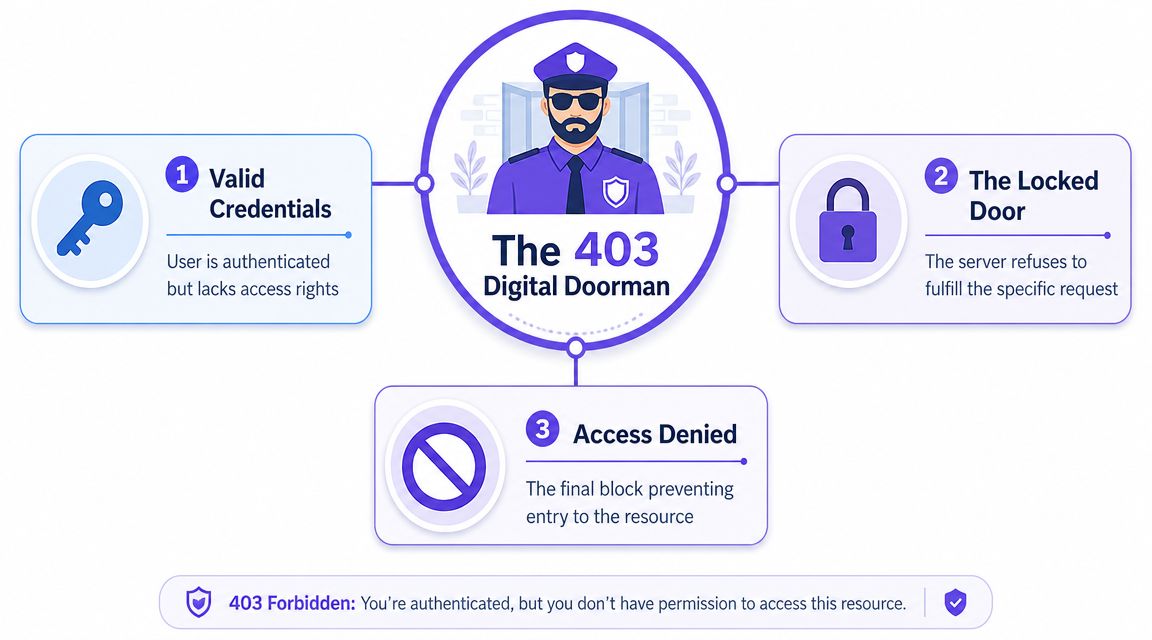
The basic gist is this: a 403 is the product saying, “I know who you are, or at least I understand what you're asking for, but you still can't do this.”
That makes it a different kind of failure from the ones users usually imagine.
A doorman, not a missing building
A 401 says your credentials are the issue. A 404 says the resource can't be found, or is being concealed as not found. A 403 says the resource is real, the request is intelligible, and access is intentionally denied.
That's why the “digital doorman” metaphor works. The request reaches the door. The system evaluates it. Then the door stays shut.
For product teams, that difference changes everything from support scripts to UI copy. If the problem is identity, you prompt a login or session refresh. If the problem is authorization, that message is misleading.
Why generic error copy makes this worse
Most products still respond to 403s with dead language: Forbidden. Access denied. Contact administrator.
That may be technically accurate, but it's operationally weak. Users need context. Is this feature plan-gated? Role-restricted? Region-blocked? Network-blocked? Temporarily unavailable because a security rule fired?
Better UX meets better diagnostics as teams experimenting with AI tools for contextual error messages are moving in the right direction, because the right message can separate a support issue from an upgrade opportunity, or a real denial from a false positive.
A 403 should answer two questions fast: why access failed, and what the user can do next.
If your product can't answer those questions, the user invents their own explanation. Usually, it's not flattering.
Diagnosing the Most Common Root Causes
Most 403 investigations go sideways because teams start with the symptom, not the layer. They ask, “Why can't the user access this page?” when the better question is, “Which control plane rejected the request?”
That's a useful distinction for PMs because different causes produce the same user-facing result. The browser shows one terse message. Underneath, several systems might be responsible.
A practical baseline comes from Network Solutions' explanation of common 403 causes, which identifies the recurring patterns: misconfigured file permissions, corrupted or overly restrictive .htaccess rules, missing index files in directories where listing is disabled, and blocking by firewalls or CDNs.
Read the symptom by layer
When a 403 appears on a public site or app route, start by locating the denial point.
| Symptom | Likely Cause | Primary Fix Area |
|---|---|---|
| Entire directory returns 403 | File or folder permissions are too restrictive | File system and deployment settings |
| Specific path fails after config change | Rewrite rule or deny rule is blocking access | Server configuration |
| Public route fails only at edge | Firewall, CDN, or bot protection blocked request | Security layer |
| Directory URL fails but file paths work | Missing index file with directory listing disabled | App structure or server defaults |
| Access breaks for one user group only | Role or entitlement mismatch | Application authorization logic |
That table won't fix the issue by itself, but it tells the right people where to look first.
What bad configuration often looks like
A lot of 403s come from rules that were added with good intentions and poor review. Teams block a directory, harden a route, restrict a pattern, or tighten a deployment permission. Then a legitimate flow gets caught in the blast radius.
In Apache-style setups, a deny rule can be painfully blunt:
Order allow,denyDeny from allIf that lands in the wrong place, your app isn't partially broken. It's intentionally refusing everyone.
A rewrite or access rule can be just as damaging when it scopes too broadly. The same is true in Nginx when a location block forbids access to a route that the application still expects to serve.
location /admin {deny all;}That may be correct for a sensitive area. It's a disaster if someone moved feature settings under /admin without aligning product expectations, role design, and route ownership.
Diagnostic habit: Ask whether the request was denied by the app, the web server, or the security perimeter. Until you know that, you're guessing.
Permissions are boring, until they aren't
File and folder permissions don't get much airtime in product meetings, but they matter because they create deterministic failures. If a directory is inaccessible, users won't “try again later” into a better outcome.
This is also why permissions work deserves rigor in enterprise environments. If your team handles content systems, document repositories, or admin-heavy products, a resource like the SharePoint migration permissions guide by Ollo is useful because it shows how permission design and migration discipline affect downstream access outcomes. Different stack, same lesson: permissions debt turns into user-facing denial.
A friend at a growth-stage SaaS company told me they spent days debating whether a launch issue was a frontend regression. It wasn't. A security rule and a role mismatch were both involved, so only a narrow group saw the failure. Everyone else declared the release healthy.
That's why Edge Case Testing in UX matters here. The happy path rarely catches a 403. The unusual combination of role, route, geography, and account state does.
The Silent Killer of Conversion Funnels
Users don't classify failures the way teams do. They don't separate policy, permissions, entitlements, and infrastructure into neat buckets. They just know a task that should have worked didn't.
That's why 403s are so corrosive inside a funnel. A user arrives with intent, tries to move forward, and the product blocks them at the exact point where momentum should convert into value.
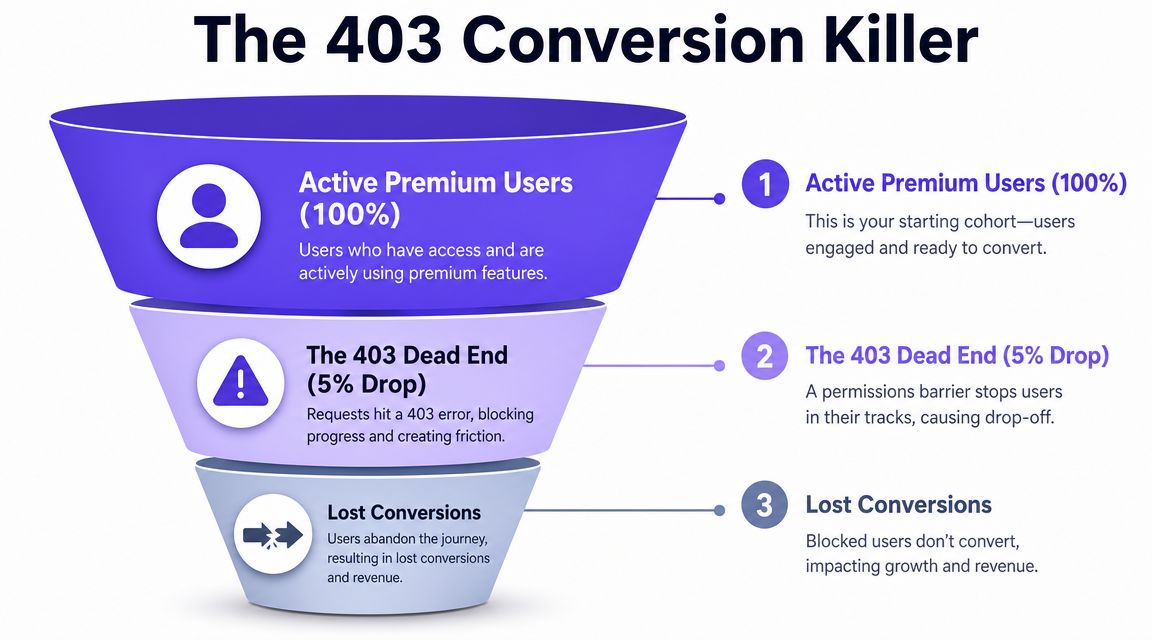
One of the most useful nuances here comes from Allconnect's explanation of 403 user-side causes. It highlights something many technical guides miss: a large share of user-facing 403s are not “site is broken” problems at all. They can be caused by content owner restrictions, geo or user restrictions, prohibited IPs, VPN use, network reputation, or entitlement policies. For product teams, that means the user experiences a failed feature or broken login even when the underlying cause sits in policy or access logic.
The funnel view changes the conversation
When support reports “users can't access feature X,” the instinct is often to route the issue to engineering and wait for a fix. Product leaders should translate that immediately into journey language.
Where in the funnel did this happen?
If it happened during signup, activation suffers. If it happened at checkout, conversion suffers. If it happened on a paid feature, trust and expansion suffer. If it happened inside a team workflow, perceived product reliability suffers.
This is what I mean by the invisible wall. The wall doesn't just block a request. It blocks the next business event that request was supposed to enable.
Common places where 403s do the most damage
Some contexts are especially expensive because the user intent is already strong:
- Billing and account management: A user is trying to pay, upgrade, or manage access.
- New feature adoption: Marketing and product drove interest, then authorization denied entry.
- Admin setup flows: The buyer is configuring the workspace and hits a permissions block.
- Documentation or support resources: The user needs help and gets denied from the help itself.
Last week I watched a PM walk through a newly launched feature with customer-facing teams. Sales said the feature existed. Support had screenshots. The PM opened the flow as a real customer role and got denied. Nobody had tested the exact entitlement state attached to the launch plan.
That's not rare. It's what happens when launch readiness focuses on feature completeness and skips access realism.
If the user is entitled to value but blocked by policy, the product feels dishonest even when the code is behaving as configured.
Platform-specific reality
In WordPress, a plugin or security rule can trigger a denial before application logic gets a chance to explain it. In Cloudflare, an edge rule can block a request pattern that your app team never sees. In SaaS products with homegrown RBAC, the issue often lives in plan-to-role mapping rather than infrastructure.
Different stack, same business effect.
The zoom-out matters because organizations optimize for what they can count, and many teams still count 403s as technical noise. That's a mistake. A 403 on a key path is not noise. It's an interruption in value delivery.
Building a Proactive Monitoring System
Reactive debugging is too late. By the time a customer reports a 403, the product has already failed in the wild.
That's why strong teams build an early warning system around access failures, especially on routes that matter for activation, setup, payment, and feature adoption.

I've found that the most effective monitoring setup has three parts, and none of them is glamorous. That's exactly why they work.
Log with business context
A raw 403 count is useful, but it won't tell you who got blocked, where, or whether the denial was expected. Teams need logs that preserve context: request path, account or workspace identifier, role, plan, feature flag state, and the layer that issued the denial if that's available.
Without that, PMs and support teams can't separate valid access control from broken access control.
Operating principle: Monitor the user journey, not just the server response.
Test critical paths synthetically
A login route can be healthy while a post-login action is denied. A homepage can return successfully while a premium flow is inaccessible. That's why synthetic checks should mimic real user journeys across meaningful roles.
Run them against the moments that matter: create project, invite teammate, upgrade plan, export report, open admin settings, start trial feature. The goal isn't more dashboards. The goal is earlier certainty.
This is also where a system that tracks post-launch feature performance becomes valuable, because launch health should include access health, not only latency and click volume.
A useful walkthrough on the operational side is below:
Alert on deviation, not just outage
Many 403s won't look like an outage. They'll look like a small but meaningful shift in who can do what. That's why anomaly detection matters. Watch for spikes in denied requests on specific routes, roles, or geographies. Compare expected access patterns against actual ones after launches, pricing changes, entitlement updates, and security rule changes.
A PM at a B2B software company once told me the most valuable alert they ever added wasn't for downtime. It was for “sudden increase in access denials on newly released paths.” That alert changed launch review from passive observation to active intervention.
The basic idea is simple: if a route is strategically important, don't wait for humans to notice it's become a locked door.
Designing Resilient Product Access
The best 403 strategy starts long before a denial page appears. It starts when the team decides who should have access to what, under which conditions, and how the product will explain those boundaries.
Access design is product design.
That sounds obvious, but many teams still treat authorization as a backend implementation detail. Engineering builds the rules late, product writes the requirements broadly, design focuses on the happy path, and support inherits the confusion. Then launch week arrives and users discover the gaps.
Define access as part of the feature, not after it
Every meaningful feature should ship with an explicit access model. Which plans can use it? Which roles can view it? Which roles can edit it? What happens in trial accounts? What happens in workspaces with custom permissions? What happens when an account is downgraded?
If those questions aren't answered in the requirements, the product is leaving policy to inference.
A disciplined team documents at least these boundaries:
- Plan access: Which commercial tier includes the feature.
- Role access: Who can view, configure, approve, or export.
- Environment access: What changes between internal, staging, and production contexts.
- Exception states: Suspended accounts, expired trials, policy-restricted regions, blocked networks.
This is also where feature flag best practices help. Flags are useful for controlled rollout, but they can create confusing overlaps with RBAC and entitlements when no one owns the combined logic. A feature can be “on” in the flag system and still inaccessible in practice.
Design the denial state like it matters
Most 403 pages are written for systems, not people. They state the refusal and stop. That's lazy design.
A resilient product gives the user a precise reason when appropriate and a next step whenever possible. If access is based on role, say that. If it's based on plan, say that. If the account owner needs to grant permission, make that visible. If a network restriction may be involved, say so in plain language.
Good denial copy often does three jobs at once:
- confirms the request was understood
- explains the likely access boundary
- offers a recovery path
For example, “Your role doesn't include access to Analytics Export. Ask a workspace admin for permission” is far better than “403 Forbidden.” So is, “This feature is available on the Enterprise plan. View plan options.” Those aren't just nicer messages. They reduce support load and preserve momentum.
Design every denial page with the same care you give a checkout error. Both happen at moments of high intent.
Separate valid denials from broken denials
Not every 403 is wrong. Some are doing exactly what the product intended. The mistake is treating all denials as equivalent.
A valid denial protects the system and teaches the user what boundary they hit. A broken denial blocks a legitimate action because the implementation, entitlement mapping, or security policy is misaligned.
Product teams should review both categories differently. For valid denials, optimize the explanation and recovery path. For broken denials, fix the rule and add a regression test that mirrors the actual user state that failed.
Plesk's documentation offers a useful reminder that 403s can also show up in infrastructure-specific workflows, not just end-user screens. In one documented case, the Web Statistics page returned a 403 with messages such as “Symbolic link not allowed or link target not accessible,” and the remediation involved backing up data, regenerating statistics with ./rebuild-awstats.sh -R example.com, and recalculating afterward. Plesk also warns that if Apache and nginx are both enabled, logs may not be sorted by timestamp, which can produce incorrect AWStats values (Plesk's Web Statistics 403 remediation guide).
That example matters because it shows how access errors can distort reporting and operations too. The problem isn't always a user looking at a page. Sometimes it's a system workflow that stops producing trustworthy output.
The operating cadence that actually helps
If you want fewer damaging 403s, don't wait for quarterly audits. Add access review to launch readiness. During feature planning, define the access matrix. During QA, test roles that differ from internal defaults. During rollout, watch denial patterns on critical paths. After launch, review support tickets and denied-route logs together.
A short personal vignette says it best. I watched a product lead turn a rough launch review into a sharp one by asking a single question: “Show me the denial states for every role we're shipping this week.” That question exposed missing copy, one entitlement mismatch, and a route protected too early by a security layer.
None of those issues were visible in the happy path.
Schedule a 30-minute review before your next release. Bring product, engineering, design, and support. Walk through the denied states, not just the successful ones. If a legitimate user gets blocked, what will they see, what can they do next, and who will know first?
That meeting won't eliminate every server error 403.
It will stop some of the most expensive ones from ever reaching your customers.
Figr helps product teams design for realities like this before they become production problems. It learns your app context, surfaces edge cases, generates user flows and test cases, and helps teams turn fuzzy product logic into clear, reviewable artifacts. If you want a faster way to map access states, denial scenarios, and post-launch UX risks, explore Figr.
