
It’s Monday morning. A product manager stares at a dashboard. Signups are up after last week's launch. But the activation rate is completely flat. Users arrive, click around for a minute or two, and then they’re gone, lost in the digital ether.
This isn’t a bug in the code; it's a gap in perception. The fragile window between a user signing up and them achieving their first real win. This is where your product onboarding has to make the product's value tangible, fast. If it doesn’t, their attention drifts, and that new user you worked so hard to acquire is gone.
Probably for good.
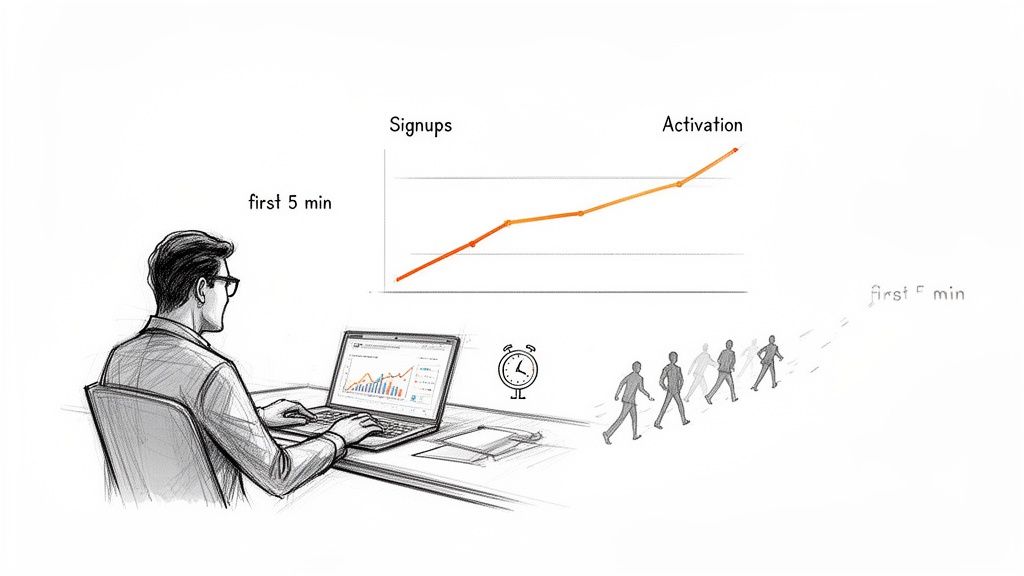
This is what I mean. Great product onboarding is the designed journey from a user’s first click to the exact moment they realize, "Ah, I get it. This is valuable." It's about activation, engagement, and long-term retention.
The Silent Killer of Growth
I was talking to a friend last week, a PM at a promising Series C company. Her team had spent a full quarter building a powerful new analytics module. The launch went well, pulling in hundreds of signups in the first week. But the data told a frustrating story.
Fewer than 10% of those new users ever created their first report. They’d log in, stare at the empty dashboard, and leave within three minutes. "It feels like we built a beautiful, empty restaurant," she told me. "People walk in, admire the decor, and leave before even looking at the menu."
Her situation isn't an outlier. It’s the default outcome when the first-run experience is treated like a checklist item instead of the most critical part of the entire user journey.
The Zoom-Out: Economics of the First Five Minutes
So why is this first experience so important right now? Because the economics of software have changed. Acquiring a customer is more expensive than ever, which means profit hinges almost entirely on retention. And that retention is forged, or shattered, in the very first session.
The market no longer rewards products that are merely powerful; it rewards products that are immediately useful. Your new user is running a quick, subconscious cost-benefit analysis: Is the effort it takes to learn this thing worth the value it promises?
The basic gist is this: your onboarding isn't a series of pop-up tooltips. It's your most powerful lever for turning a curious visitor into an activated, paying customer. It's a guided path to an immediate win, often enhanced by technology like AI for trial feature suggestions that can adapt to what a user actually needs.
The Activation Gap: Why Most Product Onboarding Fails
Imagine a new user lands in your product. They are standing on one side of a chasm. On the other side is the 'Aha!' moment, the point where they truly understand the value for themselves. Most products just hand them a map of the far side and wish them luck.
This is why they churn.
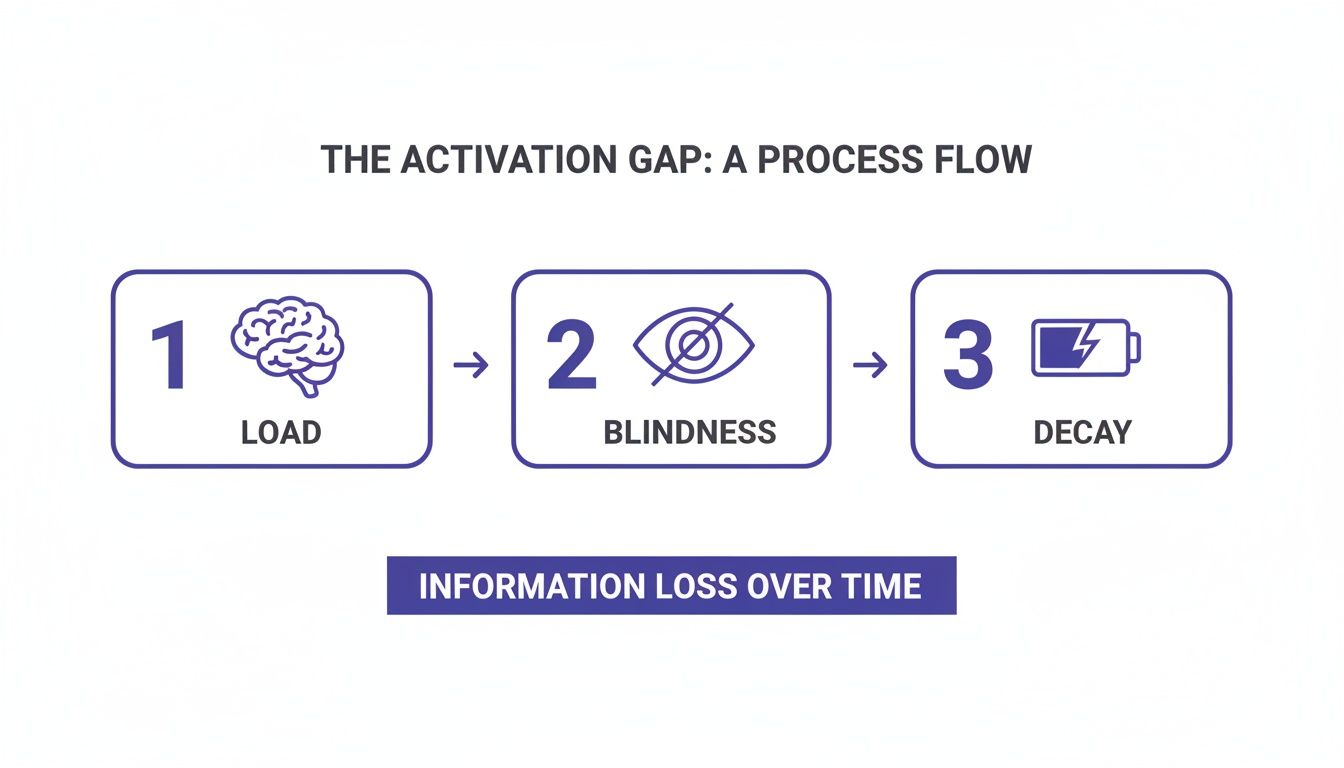
The space between what your product can do and what a new user understands it can do for them in the first five minutes is what I call the Activation Gap. This isn’t a feature problem. It’s a perception problem, widened by three invisible forces that pull a new user away from ever seeing that value.
The Three Forces That Widen the Gap
First, there’s Cognitive Load. This happens when you greet a new user with a dozen buttons, five navigation menus, and a dashboard full of possibilities. Faced with too many choices, the human brain often makes no choice at all. It’s overwhelming. So they leave.
Next is Context Blindness. This is the poison of generic, one-size-fits-all product tours. Your product shows off every feature, assuming the user magically knows which ones matter. Are they a manager or an individual contributor? A generic tour doesn't know, so it just talks, and the user quickly stops listening.
Finally, there’s Motivation Decay. A user's motivation is a battery, and every pointless click drains it. Without an immediate reward or a clear sign of progress, that battery dies. They abandon the session.
These forces are not abstract. They have a direct, measurable impact on your bottom line. Research shows a structured onboarding program can boost new user retention by 82%, yet a surprising 36% of programs still lack any real structure. With the global onboarding software market projected to hit $2.12 billion by 2026, driven by a 20% CAGR, can product leaders afford these unforced errors?
From Feature Tours to Value Discovery
What’s the antidote? The goal isn't tour completion; it is value discovery.
Your job isn't to show a user everything. It's to guide them to the one thing they need to do right now to solve their immediate problem. This requires a deep understanding of what is behavioral analytics and how to apply those insights to a user's first critical moments.
Mapping out user flow examples is the first step. It forces your team to visually confront the journey from a user's perspective, not your product's. By charting every click and decision, you can spot exactly where the Activation Gap exists. Only then can you start building the bridges to cross it.
Mapping Your Product Onboarding Flow
How do you build an experience that reliably closes the Activation Gap? It's not about guesswork or copying your favorite app's latest redesign. It’s a methodical process, working backward from the single point of value a user must feel to stick around.
Successful product onboarding isn’t a tour. It’s a mission. Your job is to define that mission's one critical objective, then bulldoze a clear path for the user to complete it.
Defining Your 'Aha!' Moment
Before you sketch a single screen, you have to answer one question: what is the one action a new user can take that makes them think, "Ah, I get it now"? This is your 'Aha!' moment. It's where your product's promised value becomes real.
For a project management tool, it might be creating and assigning a first task. For an analytics platform, it’s seeing the first chart populate with their own data. Everything in your onboarding flow must be ruthlessly engineered to get users to this specific point with as little friction as possible.
If you can't name it in one sentence, your team isn't aligned, and your onboarding will feel hopelessly unfocused.
Segmenting Your Users
Once you know the destination, you have to ask: who is making the journey? A one-size-fits-all onboarding flow is a classic sign of a low-activation product. An admin setting up an organization has different needs than a junior team member invited to a pre-existing project.
Effective SaaS onboarding demands segmentation. Who are you building for? Consider these dimensions:
- Role: Are they a manager, an individual contributor, or an admin? Their first valuable action will be worlds apart.
- Job-to-be-Done: Why did they really sign up? Are they trying to solve a complex, long-term problem or just a quick, one-off task?
- Technical Skill: Is this user a power user who breathes complex interfaces, or a novice who needs a gentler introduction?
Your onboarding has to adapt. A manager needs to see how to invite team members first. An analyst needs to connect a data source. Ignoring this is like handing everyone the same map, a crucial misstep in crafting what is a user journey map for your key personas.
Structuring the Journey
With your 'Aha!' moment defined and your users segmented, you can start structuring the actual product onboarding flow. This isn't just about designing pop-ups. It's about picking the right guidance mechanism for the right context.
You have three main tools:
- Product Tours: Best for a quick, high-level lay of the land. Use them sparingly to orient a user to key navigation areas. Never rely on them to teach a workflow.
- Interactive Walkthroughs: Instead of just showing the user where to click, you guide them to perform the core action themselves. This hands-on approach builds muscle memory.
- Contextual Hints: Small tooltips or hotspots that appear based on user action. They deliver the right information at the exact moment of need.
Of course, designing these complex user experience flows, especially with branching logic, can feel monumental. Prototyping platforms like Figr help turn these abstract flowcharts into tangible artifacts. Figr prototypes onboarding flows with all edge cases included: what happens when a user skips steps, returns after abandoning, has a different role, or encounters errors during setup. It surfaces the scenarios your team hasn't thought of, like in this complete LinkedIn recruiter flow.
A user doesn't care about seeing every feature you’ve built. They care about solving the problem that brought them to you.
Designing For Activation, Not Just Completion
There’s a mistake I see product teams make over and over. It’s the gravitational pull to design product onboarding for completion, not activation. We obsess over drop-off rates but forget to ask: Did they actually accomplish anything?
The solution? Shift your focus from showing features to delivering what I call the Minimum Viable Win.
The Minimum Viable Win is the smallest, most immediate success a user can experience that delivers a disproportionate feeling of progress and value.
It's that first "aha!" moment. It’s the tangible proof that your product works for them.
This isn't just a fuzzy concept, it's rooted in psychology. Small, tangible wins are powerful motivators. A landmark Harvard Business Review article on "The Progress Principle" found that making headway on meaningful work was the single most powerful driver of a positive inner work life.
The same principle is the lifeblood of a great product onboarding flow. Each small win builds a user’s confidence and investment.
Reduce Friction with Smarter Defaults
One of the best ways to get users to that first win is to remove the friction of a blank slate. Use smart, adaptive defaults.
Instead of greeting a new user with an empty screen, you make intelligent choices for them based on their role or job-to-be-done. For a project management tool, this could mean pre-populating a new project with a "Q3 Marketing Campaign" template. The user's first action is to customize, not to create from scratch. That's how you start building better digital customer journeys.
Personalization Through AI
This is where AI is a game-changer for SaaS onboarding. Instead of static assumptions, AI can personalize the journey in real-time.
For example, an AI can analyze a user's sign-up data or their very first clicks. Did they sign up from a company in e-commerce? The onboarding can immediately guide them to the Shopify integration. Suddenly, a generic user onboarding product feels like a personal consultant.
The numbers back this up. Onboarding completion is a top predictor of 30-day retention, which is critical when 88% of SaaS revenue depends on renewals. AI tools for creating interactive product walkthroughs are no longer a novelty; they are standard practice.
Ultimately, a great onboarding experience makes the user feel seen, smart, and successful. For complex products, visualizing all possibilities is essential. Tools that can map out every state, like the Figr memory management example, are invaluable for designing robust systems that don’t break when a user wanders off the happy path.
Product Onboarding Best Practices For The AI Era
The old onboarding playbook is broken. That world of rigid tooltips and one-size-fits-all tours is over. We’ve entered an era of intelligent, proactive guidance. The best onboarding today feels less like a manual and more like a conversation.
Here’s what I mean. A product manager used to agonize for weeks over the “perfect” product onboarding flow. Today, that process is inverted. AI-driven tools can ingest a capture of your live application, benchmark that flow against a library of proven UX patterns, and generate high-fidelity prototypes that account for variables your team hadn’t considered.
From Static Guides to Dynamic Systems
The real evolution is the shift from a static guide to a living, responsive system. Instead of treating every user the same, AI lets us deliver deep personalization at scale. Exploring the current landscape of the best AI tools for business can open your eyes to new ways of getting this done.
Think about two major steps forward:
- Intelligent Checklists: A traditional product onboarding checklist is just a fixed to-do list. An AI-powered version is adaptive. Using AI tools for interactive checklists, the system watches what a user does. It can then reorder, add, or remove items on the fly to match that user's real behavior and get them to their "Aha!" moment faster.
- Proactive Feature Surfacing: Why wait for a user to stumble across a key feature? AI can look at a user's role and first few clicks to proactively highlight the most relevant tool. A user from a big B2B company might see the Salesforce integration pop up, while someone from an e-commerce brand gets guided toward the Shopify connector.
This changes everything. Onboarding is no longer a passive act of information consumption. It’s an active, guided discovery.
Prototyping The Unseen Scenarios
Last week, I watched a team demo their new SaaS onboarding prototype. It was clean. It followed all the standard advice. Then I asked a simple question: "What happens if a user with an admin role comes back to this step two weeks after abandoning the setup?"
Silence.
No one had thought about it. Designing the happy path is easy; the problem is, users almost never stick to it. They get interrupted. They have different permissions. They make mistakes. Great onboarding embraces this messiness.
In short, this is where a tool like Figr becomes non-negotiable. By learning directly from your live app, it prototypes onboarding flows with the edge cases already baked in. It shows you exactly what happens when a user skips a step, has a different role, or hits an error. It forces your team to confront the scenarios they missed, turning a fragile, linear flow into a resilient, state-aware system.
Your Actionable Onboarding Audit
Theory is one thing. Reality is another.
Your strategy decks look great, but the hard truth about your product’s first impression lives in the messy, real-world flow a new user navigates. It's time to stop theorizing and start experiencing your own product from the outside.
It’s time to run an onboarding audit.
This exercise isn’t complicated, but it is brutally honest. It grounds every abstract idea we’ve talked about in something you can do in the next hour. Will it be uncomfortable? Probably. It will expose the gap between the journey you designed and the one users actually endure.
The Four Steps of a Self-Audit
The goal here is simple: feel what your new users feel. This process uncovers the exact points of confusion that have become invisible to you and your team.
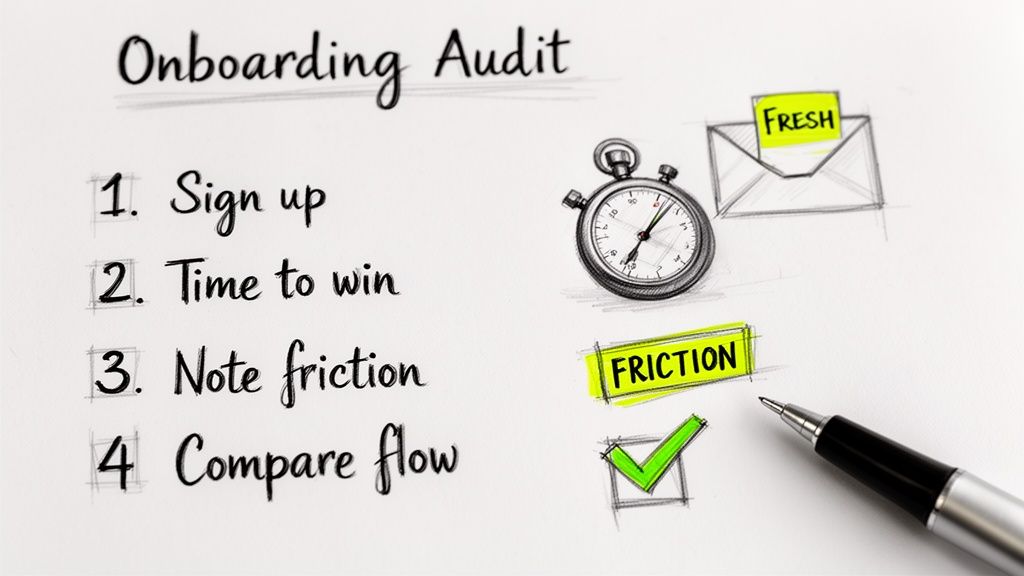
Here’s your simple, four-step process:
- Sign Up Fresh: Open an incognito window. Go to your own website and sign up for your product with a brand-new email address. No internal shortcuts.
- Time to Value: Start a timer. Your goal is to reach that one specific "Aha!" moment. How long does it actually take? Be honest.
- Document Every Point of Friction: Note every single moment of hesitation or confusion. Was a button label unclear? Where did you get stuck? Write it down.
- Compare and Contrast: Now, pull up that ideal product onboarding flow you mapped out. Put your audit notes side-by-side with your diagram. Where do they diverge? This is where the insights are.
This self-audit is one of the most powerful, low-cost diagnostic tools a product team has. If you want a more structured approach, you can dig deeper with a comprehensive UX audit checklist to guide your analysis.
For the complete framework on this topic, see our guide to AI assistants for in-product UX.
When your audit shows you exactly where the experience is broken, Figr provides the logical next step. It lets you rapidly prototype and test solutions for those friction points, ensuring your next attempt at crafting the perfect first five minutes actually hits the mark.
Frequently Asked Questions About Product Onboarding
Even the best teams have questions when they get into the weeds of product onboarding. It’s one of those areas where the details make all the difference. Here are a few of the most common questions that come up.
How Do You Measure Onboarding Success?
Success isn’t just getting a user to click through a product tour. Did they really get it, or just click "Next"? You need a mix of metrics that show a user has truly activated.
Here’s what you should be tracking:
- Activation Rate: What percentage of new users complete the key actions that unlock your product's core value? This is your North Star.
- Time-to-Value (TTV): How fast does a user go from signing up to their "Aha!" moment? Shorter is almost always better.
- Feature Adoption Rate: Are new users trying the key features you’re pointing them to? This tells you if the guidance is working.
- Week 1 Retention: This is a huge predictor of long-term value. If users stick around for the first week, they are far more likely to stay for good.
What Is The Difference Between User Onboarding and Product Onboarding?
People often use these terms as if they mean the same thing, but there’s a crucial difference.
User onboarding is the whole big picture. It starts with the first ad a person sees, includes the welcome emails, and covers everything involved in turning a stranger into a registered user.
Product onboarding, on the other hand, is a specific part of that journey. It starts the moment a user first logs into your app. It’s all about the in-product experience of teaching someone how to find value on their own.
How Often Should We Update Our Onboarding Flow?
Your product onboarding flow is not a "set it and forget it" feature. Think of it as a living part of your product that needs regular attention.
Plan to review your onboarding metrics every quarter. But you’ll need a major update anytime you ship a significant new feature, see a big drop in your activation numbers, or get a wave of user feedback pointing to a specific point of confusion. Treat it with the same respect you give any other core feature.
Ready to stop guessing and start building onboarding flows that truly activate users? Figr is an AI design agent that learns your live app, surfaces hidden edge cases, and generates high-fidelity prototypes that mirror your real product. Design with confidence and ship faster with Figr.
