

Many teams see the product development lifecycle as a conveyor belt. An idea enters, gets built, and pops out the other end. But this model is fragile. It's what leads to delays, miscommunication, and that 4:47 PM panic.
Time isn't a conveyor belt; it's a switchboard. Each stage is a node, and the real work happens in the quality of the connections between them. How does a user insight from discovery directly inform a design choice? How does a technical constraint found during development reshape the launch plan? Mastering these connections is the secret to building great products.
Deconstructing the Lifecycle
The traditional lifecycle gives us a vocabulary, a shared set of landmarks. You start by finding a problem, you design a fix, and you build it. Simple enough, right?
This diagram shows the classic flow, a path every product follows in some form.
While the stages look sequential, the arrows tell the real story.
It’s a feedback loop. Insights from one phase must power the next. The magic isn't in completing a stage; it's in mastering the handoff.
Last week, I watched a PM at a Series C company struggle to explain why a feature was behind schedule. The problem wasn't the engineers' speed. The problem was that the design they received didn't account for three critical edge cases that only surfaced after coding began. The switchboard had a faulty connection.
This guide will walk you through each stage, but our focus will be on the connective tissue. We'll treat each phase not as a silo, but as a part of an integrated system for building great software. So, stop thinking about just finishing stages and start thinking about strengthening the links between them. That's where the real magic happens.
The Discovery and Definition Phase: Finding the Real Problem
Before you write a single line of code, you have to play archaeologist. You must dig for the real problem. This initial search is the most critical stage in the entire product development lifecycle. It's where you earn the right to build anything at all.
This stage is a search for truth. Every user complaint, every competitor feature, every support ticket is a clue. Your job is to assemble this evidence until it tells a clear story, one that points to a specific, unmet need.
From Vague Ideas to Validated Problems
The discovery phase begins with broad questions and ends with a sharp, validated problem statement. How do you know when you've found a real problem? When you can articulate the pain so clearly that your target users nod and say, "that's exactly my situation."
You don't start with "we should build a forecasting tool." You start by hearing founders say, "I waste hours every month exporting bank statements to a spreadsheet just to guess my runway." The first is a solution looking for a problem; the second is a problem begging for a solution. A well-defined problem statement is the bedrock of your entire project.
Your core activities here are about listening, not building:
- User Interviews: Structured conversations designed to uncover not just what users do, but why they do it.
- Competitive Analysis: Mapping what others are doing, not to copy them, but to find the gaps they've missed.
- Market Validation: Using surveys or simple prototypes to see if the pain is widespread enough to matter.
A friend at a fintech company told me they spent six weeks in discovery for a new feature. Leadership grew impatient, asking, "Where are the wireframes?" But that early patience paid off. Their research revealed the problem they thought they were solving was only a symptom of a much larger, more valuable one. They launched a feature that captured a new market segment, something impossible if they had rushed into design.
Defining Success With a PRD That Works
The discovery phase bleeds directly into definition. This is where you translate all those clues and insights into a concrete plan. The main deliverable here is the Product Requirements Document (PRD).
The purpose of a PRD isn't to document every detail. It's to create shared understanding on the what and the why, so engineering and design can own the how. A PRD that engineers actually read focuses on outcomes, not outputs. It’s built on jobs-to-be-done (JTBD) and clear success metrics. "Make forecasting easier" is useless. A strong requirement is: "As a founder, I need to see my projected cash-out date based on current burn, so I can make hiring decisions confidently."
This is the what I mean: you turn messy human needs into a clear, actionable document. For example, that vague ask for a runway tool can become a clear plan through targeted research. You can see how founder needs get translated into a practical PRD for Mercury's Runway Forecasting.
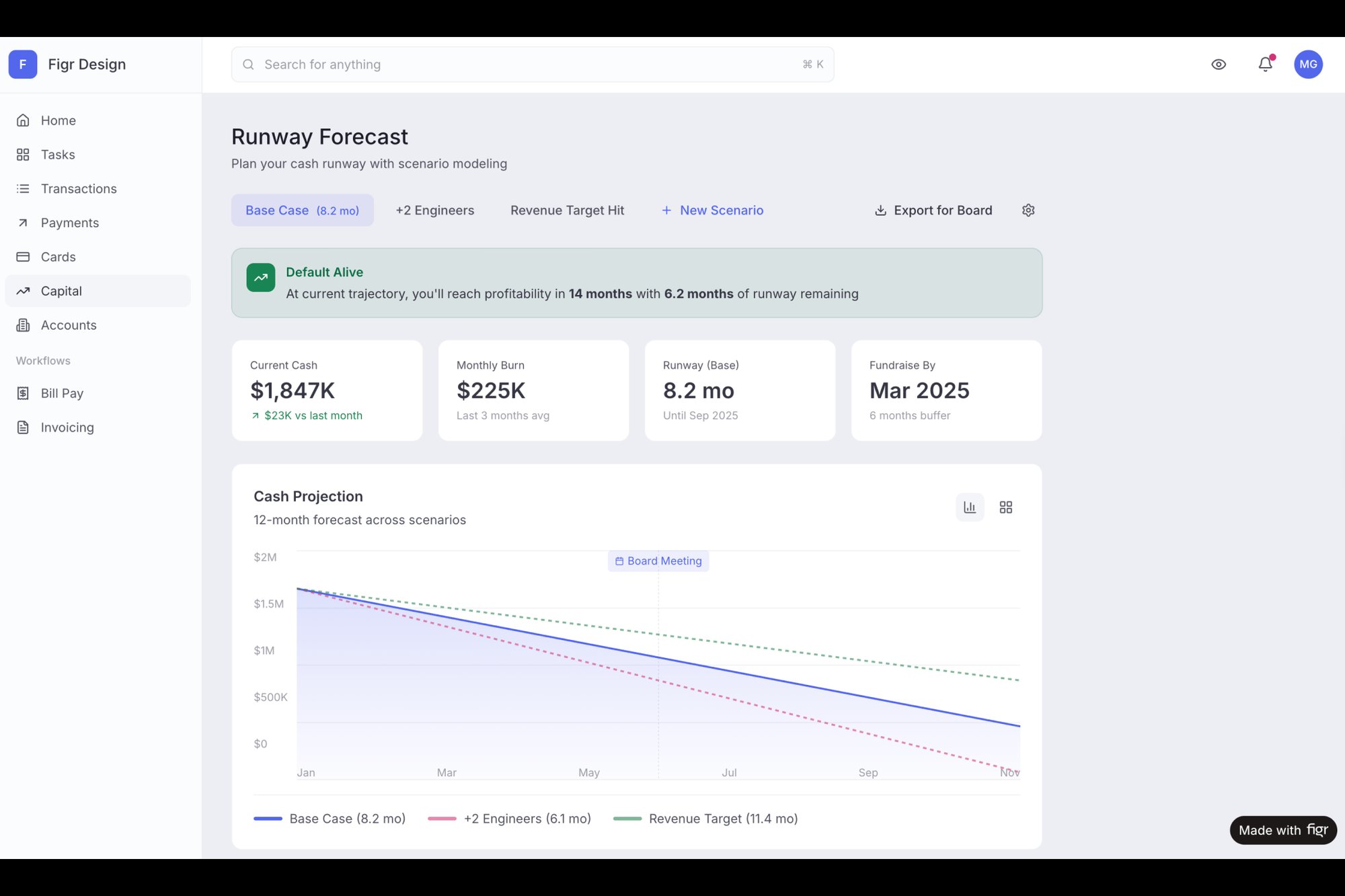
The takeaway is this: discovery and definition aren't bureaucratic hurdles. They are the act of de-risking your entire project. Invest the time here to find the real problem, and you’ll save months of building the wrong solution later.
The Design and Development Gauntlet: From Blueprint to Code
If discovery is about finding the right problem, the design and development stages are where your solution takes its first real breath. This is where abstract ideas become tangible pixels and functional code. It's also the most resource-intensive part of the entire lifecycle, a gauntlet where time, money, and momentum are won or lost.
Think of it like building a bridge. Design creates the detailed architectural blueprint, specifying every material and measurement. Development is the construction crew, pouring concrete and raising steel based on that blueprint. The product manager is the chief engineer, walking the site daily to ensure what’s being built perfectly matches the plan.
A flimsy blueprint guarantees a flawed bridge.
From Blueprint to Working Code
The handoff from design to development is a notorious failure point. A static mockup is an incomplete instruction. It shows the "happy path," but what about error states, loading screens, or empty states? What happens when a user’s network drops mid-action?
This is where a lack of clarity turns a two-week engineering estimate into a six-week reality. The original estimate was for one blueprint, but the construction crew discovered they actually needed twelve. Each of those hidden blueprints required new decisions, creating a cascade of delays.
The antidote is a shared language. High-fidelity, interactive prototypes and clear user flow diagrams are no longer a luxury; they're the essential tools that make the abstract concrete before a single line of code is written. You can learn more about how prototyping in UX design bridges this exact gap between vision and execution.
The design stage is not about making things pretty. It is the process of making intent clear.
This is where you move from static images to dynamic flows. Instead of just showing what a screen looks like, you show how it behaves. For example, analyzing analytics data from a clunky process can directly inform a simpler, more intuitive design. Curious readers can explore this in practice with the new setup flow for the Shopify Checkout Redesign project, which visualizes a redesigned flow based on real data.
Closing the Communication Gap
How do you prevent delays? You build the bridge together. Modern tools help teams create a single source of truth that serves both design and development.
- Interactive Prototypes: Allow engineers to click through a flow and understand its logic, not just its appearance.
- Component-Based Design: Ensures consistency by building with predefined, reusable blocks from a design system.
- Automated Spec Generation: Tools can inspect a design and provide developers with exact measurements, colors, and font styles, eliminating guesswork.
In short, the goal is to resolve ambiguity before development starts. Every question answered in the design phase is a potential delay avoided in the development phase. Teams that adopt this pre-review rigor routinely report cutting design review cycles by 70% or more by catching compliance and completeness issues before the meeting even starts.
The grounded takeaway here is simple: treat your design artifacts as the primary communication tool. Your high-fidelity prototype isn’t just for stakeholder demos. It’s the most important document you’ll hand to your engineering team. Make it clear, make it comprehensive, and make it interactive. Your timeline will thank you.
You can discover more insights about how modern teams overcome these product lifecycle challenges and slash rework.
The Unsung Heroes Of QA and Testing
A feature isn't done when it’s coded. It's done when it works. For everyone. Under any condition. This brings us to one of the most vital, yet consistently rushed, stages in the product development lifecycle: Quality Assurance and Testing.
This stage is the final dress rehearsal for a play. You don't just check if the actors remember their lines on a good night. You test what happens if a prop breaks, if a cue is missed, or if the stage lights flicker. You have to test every scene, especially the ones you think are foolproof.
Beyond Bug Bashing
QA is so much more than "bug bashing." A truly resilient product has been vetted across multiple dimensions, moving far beyond the happy path. Has your team considered all the ways this can fail?
The basic gist is this: you must validate not only that the feature works as intended but also that it doesn't break in unintended ways.
This means expanding your testing scope to cover:
- Usability Testing: Can real users actually figure out how to use the feature without a manual?
- Performance Testing: What happens when 1,000 users hit the same button at once? Does it all grind to a halt?
- Edge Case Validation: How does the feature handle empty states, network failures, permission errors, and weird user inputs?
Last quarter, a PM at a fintech company shipped a file upload feature. Engineering estimated 2 weeks. It took 6. Why? The PM specified one screen. Engineering discovered 11 additional states during development. Each state required design decisions. Each decision required PM input. The 2-week estimate assumed one screen. The 6-week reality was 12 screens plus 4 rounds of 'what should happen when...' conversations.
From Reactive Bottleneck To Proactive Quality Gate
This is exactly where the QA stage so often becomes a bottleneck. It’s the moment when all the assumptions made in earlier stages are finally put to the test. What if you could surface all that complexity before a single line of code is written?
This is how you shift QA from a reactive, end-of-the-line check to a proactive quality gate that informs the entire process. The goal of testing is not to find bugs, but to build confidence that there are no major bugs left to find. It's a subtle but powerful distinction.
By mapping every state, every success, error, and transitional moment, you create a comprehensive blueprint for quality. An excellent example of this is the edge case map for Dropbox's upload failures. This visual map documents every possible scenario, from size limits to duplicate conflicts, turning unknown risks into a known, testable checklist. From this deep understanding, you can then automatically generate the very test cases QA will need later. If you want to dive deeper into this, our guide on how to create test cases explains the process in detail.
This approach transforms the QA phase. Instead of scrambling to find issues, the team executes a plan derived directly from the design and definition stages. To further ensure product quality and validate ideas, exploring methods such as a complete guide to synthetic user testing can be invaluable.
The grounded takeaway is to start asking "What could go wrong?" much earlier. Challenge your team to map out at least three unhappy paths for your next feature. By treating testing as a design activity, not just a post-development chore, you build resilience and reliability directly into your product.
Launch and Post-Launch Monitoring: The Starting Line
Launch day isn't the finish line. It's the starting line.
This is where the product development lifecycle pivots from building and testing to delivering and learning. It’s less like a product release and more like a rocket launch: a period of intense, coordinated activity followed by careful, continuous monitoring to ensure your payload reaches its intended orbit.
A successful launch isn't measured by on-time delivery alone. It's measured by initial adoption, user feedback, and the team's ability to react swiftly to the inevitable post-launch turbulence.
Preparation Is Everything
A 2018 report in Harvard Business Review noted that companies with disciplined product development processes convert more concepts into successful products and launch them 25% faster than their peers. That discipline is most visible right before launch. You can read the full research about these new product development process findings for more context.
The basic gist is this: preparation is everything. This means having a clear plan that covers more than just flipping a switch.
A solid go-to-market plan includes:
- Internal Alignment: Does marketing know what they're selling? Does support know how to troubleshoot it? Does sales understand the value proposition? (Don't assume. Check.)
- Phased Rollouts: Will you launch to everyone at once, or start with a beta group? A phased approach de-risks the launch by catching major issues with a smaller audience.
- Launch Comms: How will you announce the new product or feature to users? Think in-app notifications, email campaigns, and blog posts.
- Success Metrics: What does "good" look like one day, one week, and one month after launch? Define your key performance indicators (KPIs) upfront.
The Watchful Eye After Launch
Once the product is live, the work shifts from building to listening. Your beautiful, well-tested feature is now in the wild, interacting with real users in unpredictable ways. Did you set up the right monitoring tools to see what’s happening?
You cannot improve what you do not measure. A launch without monitoring is like flying blind.
You should be tracking both quantitative and qualitative data:
- Quantitative Data: Track metrics like adoption rate (what percentage of eligible users are trying the new feature?), engagement (are they using it once or repeatedly?), and retention (are users who engage with the feature more likely to stick around?).
- Qualitative Data: Monitor feedback channels like support tickets, social media mentions, and in-app surveys. What are users actually saying? Where are they getting stuck?
I recently saw a team launch a redesigned dashboard. Their analytics showed high initial adoption, which they celebrated. But a week later, they noticed a spike in support tickets all asking the same question. The data told them what was happening (users were clicking), but only the qualitative feedback told them why (they were confused). This crucial insight led to a quick UI tweak that resolved the issue. For teams looking to build this capability, there are powerful AI tools that monitor feature performance post-launch to help close this feedback loop faster.
The grounded takeaway is to treat your launch as the beginning of a conversation with your users. Prepare meticulously, launch with a clear plan, and then obsessively monitor the data and feedback that flows in. This information is pure gold, fueling the next, and arguably most important, phase of the product lifecycle: iteration.
The Iteration Engine: Your Launch Is Just the Beginning
The launch isn't the end. It's the starting gun.
When you ship a new product, you’re not just releasing code. You’re starting a conversation. The feedback, the support tickets, the user behavior data, that’s the user talking back to you. This final stage isn't a finish line; it’s where the cycle folds back on itself, turning raw launch data into fuel for your next discovery sprint.
This is an audio feedback loop. Get it right, and you amplify the signal, creating a richer, more powerful sound: customer value. Get it wrong, and you get that high-pitched screech of churn, technical debt, and frustrated users. The goal here is to build a systematic process for listening to what the market is telling you and turning those signals into your next move.
From Shipping Features To Learning Velocity
Let's zoom out for a second. The economics of software aren't about how many features you can pump out. It's about how fast you can learn from what you’ve shipped and turn that learning into a better product.
This is the shift from feature velocity to learning velocity. How quickly can your team close the loop from seeing the data to forming a new, validated hypothesis? This is what separates a product team that drives the business from one that just takes orders. You’re building an engine for continuous improvement, not just a factory for one-off features. A friend at a SaaS company once told me they used to celebrate launch day. Now, they celebrate "insight day," the day they have enough data to know exactly what to build next.
Tuning The Engine With Data
In a healthy system, every stage feeds the next in a perpetual cycle. Data-driven teams see higher retention and efficiency gains, all driven by a relentless focus on learning velocity. You can dig deeper into how these product development methods drive success.
- Launch Data becomes the brief for the next Discovery phase.
- QA Findings from one cycle highlight risks to address in the next Design phase.
- User Feedback clarifies what was missing from the last Definition phase.
Each output becomes the next input. This is how you build momentum.
So here’s a direct challenge for you. Pick one stage of your current process. Now, find one specific way to close the feedback loop using data from the stage that follows it. For example, take your top three post-launch support tickets and make them the explicit focus of your next discovery sprint. That one simple act is how you start tuning your engine.
Common Questions, Answered
As teams try to put the product development lifecycle into practice, a few questions always pop up. Here are the most common ones I hear.
What's the biggest mistake teams make?
The most common mistake is treating the stages like separate, isolated silos. It’s the classic "throwing it over the wall" problem. The design team finishes a prototype and tosses it to engineering, who then immediately finds a dozen unhandled edge cases. (Why does this always happen? Because they weren't in the room.) This friction leads to endless rework and delays.
High-performing teams don't see a sequence of handoffs. They see a continuous, collaborative conversation. In that world, engineering gives feedback on feasibility while designers are still sketching, and QA's findings from the last feature directly inform the next discovery phase. The goal isn't just to check off boxes in a sequence; it's to create a smooth, uninterrupted flow of value.
How can a small team actually do all this?
If you're on a small team, the key is ruthless focus, not a comprehensive process. Don't try to copy and paste Spotify's squad model when you have three people. That's a recipe for burnout. Instead, strip each stage down to its absolute core purpose.
Discovery might be ten focused customer calls, not a six-month market research project. Definition could be a crisp one-page PRD, not a 50-page document nobody will read. You have to prioritize the speed of learning above everything else. The principles of the lifecycle are the same, but the scale of your execution has to match the size of your team.
Where does AI fit into the traditional lifecycle?
AI doesn't replace the stages; it accelerates the messy, manual work between them. Think of it as the connective tissue that finally binds the whole lifecycle together. It automates the tedious translation work that slows everyone down.
In Discovery, AI can synthesize hours of user research into key themes and draft a first-pass PRD. In Design, it can turn a simple screenshot into a high-fidelity, multi-screen prototype. For QA, it can look at a flow and instantly generate a complete list of test cases, like it did here for a Waymo trip change flow.
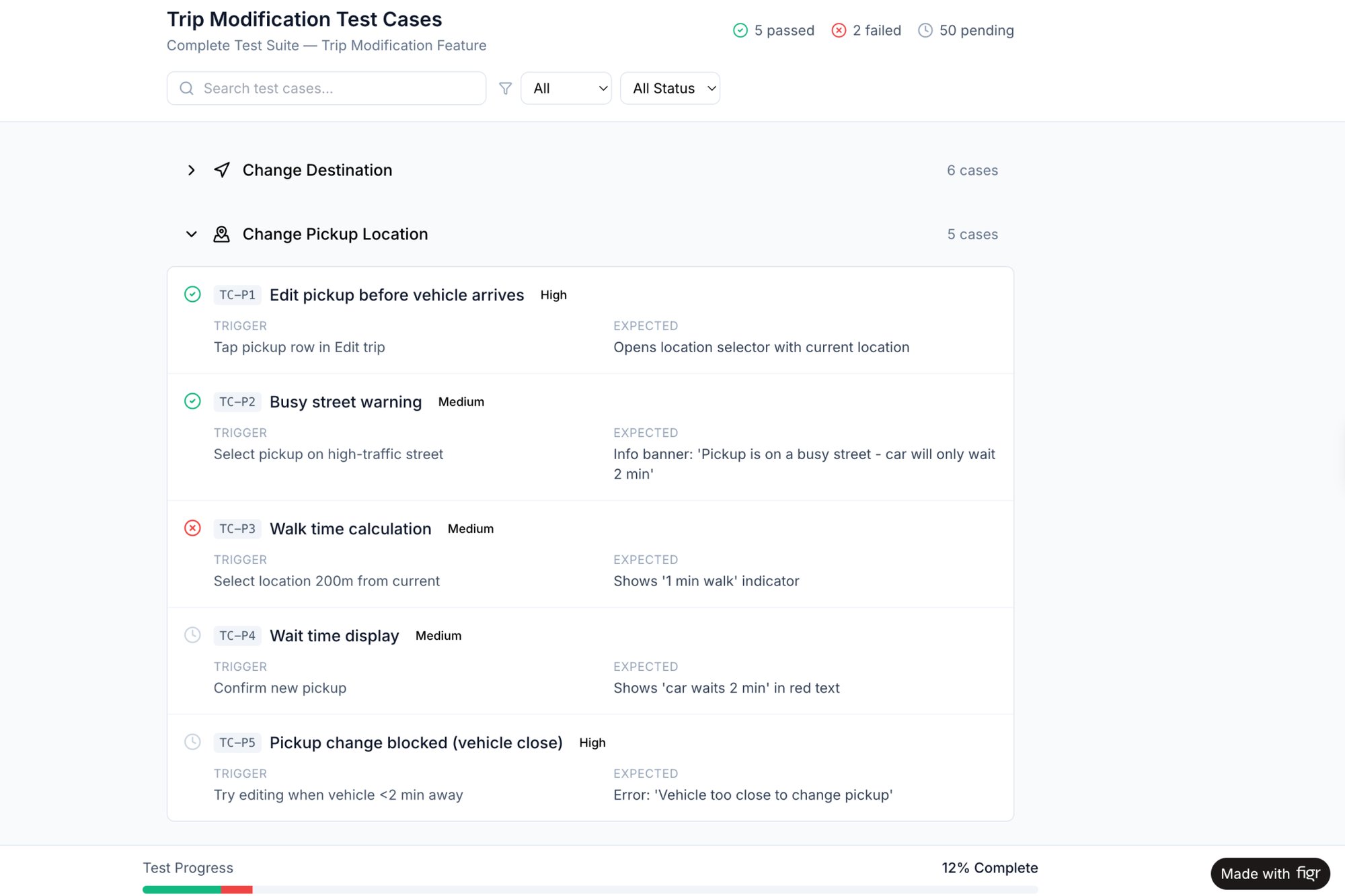
This frees up the team from the manual, repetitive tasks that drain energy and introduce errors. Instead of spending cycles translating a design into a spec, your team can focus on the high-judgment, strategic decisions that actually matter. You build confidence faster because you're not bogged down in the grunt work.
For a deeper dive into how AI reshapes each stage, read how AI for product development fixes invisible work. And if your cycle feels sluggish, diagnose the root causes with our guide to signs your product development cycle is broken.
Ready to stop wasting time on manual translation and start shipping faster? Figr learns your product and automates the creation of PRDs, user flows, and prototypes that are grounded in your reality. Get started with Figr for free.