

It’s 4:47 PM on Thursday. Your VP just asked for something visual to anchor tomorrow's board discussion. You have a PRD. You have bullet points. You have 16 hours and no designer availability. The Q3 planning document is a sea of one-line requests. ‘Implement new dashboard’ sits next to ‘Fix login button color.’ One is a mountain, the other a molehill, yet they are presented as equals.
This is where product momentum dies: in the flat, undifferentiated backlog where strategic intent goes to get lost.
An epic isn't just a big user story. It's a narrative container for delivering coherent value. Think of it as the architect's blueprint for a new wing of a house. The user stories are the construction tasks, like framing walls or installing windows. Without the blueprint, you just have a pile of lumber and a crew asking questions.
This article provides more than just a list of sample agile epics. It offers a collection of these strategic blueprints. We will break down high-quality examples for common SaaS challenges, from user onboarding to performance optimization. Each is a toolkit designed to give you the clarity needed to build things that matter.
1. Design System Implementation & Token Management
An engineer messages you on Slack: "What’s the hex code for color-brand-primary-hover?" A designer asks if card padding should be 12px or 16px. A product manager notices a new feature's button styles look slightly off. Is this a failure of people? No, it’s a failure of the system.
This epic treats consistency not as a goal, but as an output. The central analogy is a shared language. Instead of every developer speaking a slightly different dialect of CSS, the team agrees on a dictionary of design tokens. Instead of hard-coding #4A90E2, a developer references color-brand-primary. When the brand color updates, you change the token's value in one place, and the change propagates everywhere.
Why this epic is critical
A design system is the ultimate force multiplier. It's the difference between building with bespoke, hand-carved parts and building with precision-milled, interoperable components. For a scaling company, this isn't a luxury. It’s a prerequisite for moving fast without breaking the user experience. The backbone of any design system is its style guide, which can be programmatically managed and accessed through a dedicated Company Styleguide API.
Actionable Takeaways
Start Small, Win Big: Don't boil the ocean. Begin by tokenizing your core color palette and spacing scale. These have the highest impact.
Document the 'Why': A token like
spacing-unit-4xis good. Documenting that this represents16pxand is the standard padding for all card components is better. Context drives adoption.Establish Governance Early: Create a clear process for proposing, approving, and deprecating tokens. Who can request one? Who approves it? Make the rules clear.
Automate Consistency: Use tools to bridge the gap between design and code. This eliminates guesswork. To see how this works in practice, you can explore how design tokens create this bridge.
2. User Flow Mapping & Complex Journey Documentation
A junior engineer asks how a user gets to the "forgot password" screen. The QA lead wants to know what happens if a session times out mid-checkout. These aren't just questions, they are symptoms of a hidden debt: undocumented user journeys.
This epic treats the product not as a collection of screens, but as a network of pathways. The goal is to create a visual, shared map of every critical user journey, from the perfect "happy path" to the messiest edge cases. The product isn't a building, it's a city. This epic is about drawing the subway map so everyone knows how to get from one station to another.
Why this epic is critical
Without clear journey maps, teams build in silos. Features become islands connected by rickety bridges, and the user is left to navigate the mess. Documenting these flows is the difference between intentional design and accidental complexity. It provides a blueprint for empathy.
Actionable Takeaways
Map Reality First: Don't start with the ideal flow. Capture the actual user path, warts and all. For instance, mapping the true Dropbox file upload experience can reveal unexpected detours and friction points.
Prioritize with Data: Overlay your flow maps with analytics. Where are the biggest drop-offs? Which paths lead to the highest conversion? Let data guide which journeys you optimize first.
Embrace the Edge Cases: The happy path is maybe 20% of the work. Documenting what happens during network failures or with invalid inputs is non-negotiable. Creating an edge cases map for Zoom's network degradation prevents frantic, last-minute decisions.
Make it a Living Document: A user flow is a snapshot, not a permanent portrait. Establish a cadence to review and update key flows as the product evolves. Treat these maps like essential infrastructure.
3. Product PRD Generation & Requirements Standardization
It's the Monday morning kickoff. An engineer asks, "What's the actual business goal here?" A designer presents mockups based on a feature request from sales, but the user persona feels generic. These are symptoms of a deeper problem: documentation built on assumptions, not evidence.
This epic treats the Product Requirements Document (PRD) not as a checklist, but as a persuasive argument. The goal is to build a standardized process for defining why a feature should exist before defining what it should do. It systemizes the crucial question: what problem are we solving, and how do we know it's real? A good PRD is like a legal case, presenting evidence to a jury of stakeholders.
Why this epic is critical
A well-architected PRD is the constitution for a feature. It aligns engineering, design, and marketing on a common purpose and a shared definition of success. Without a standardized, evidence-based approach, you're not building a product. You're just servicing the loudest voice in the room. As Ken Norton of SVPG famously argued, the PRD's primary job is to articulate the problem, not dictate the solution.
Actionable Takeaways
Start with 'Why,' Not 'What': Your PRD template must have a mandatory "Problem Statement & Supporting Data" section at the top. Before anyone writes a user story, they must articulate the user pain and provide at least one data point to prove it's real.
Context is King: A PRD without context is a wish list. This is what I mean: use tools that ground your requirements in reality, inserting screenshots and user flows. This ensures the document starts from the user's actual experience. You can see an example PRD generated for a Spotify feature to understand this context-first approach.
Create Lightweight and Heavyweight Versions: Not every feature needs a 20-page treatise. Create two templates: a lightweight one for small enhancements and a comprehensive version for new features. This ensures rigor without creating needless overhead.
Link Everything, Centralize Nothing: The PRD shouldn't contain the final designs. It should be the central index that links out to them: the Figma file, the Jira tickets, and the QA test plan.
4. Accessibility Audit & Compliance Implementation
Someone files a bug report: they can’t complete checkout using only their keyboard. A customer support ticket arrives from a user with a screen reader who says the new dashboard is "a jumble of words." Are these edge cases?
No, they are market limiters.
This epic treats accessibility not as a feature, but as a fundamental requirement of quality. It's a systematic effort to identify and remove barriers that prevent people with disabilities from using your product. The goal is to achieve compliance with standards like WCAG 2.1 AA. An inaccessible product is like a building with stairs but no ramp, it serves some but excludes others by design.
Why this epic is critical
For many organizations, accessibility is a legal and contractual necessity. For all organizations, it's a moral and commercial imperative. An accessible product expands your total addressable market and is often a better product for everyone. It forces clarity in design and empathy in product strategy.
Actionable Takeaways
Audit Before You Build: Don't start coding fixes blindly. Begin with a comprehensive audit using a mix of automated tools and manual testing. This creates a prioritized backlog. As part of this, understanding how to make PDF accessible is crucial when documenting audit findings for all stakeholders.
Shift Left with Automated Checks: Integrate accessibility checks early. Use tools that flag issues at the design stage, preventing inaccessible components from ever reaching production.
Embed in Your Definition of Done: Make accessibility a non-negotiable acceptance criterion for all new stories. Does it have proper ARIA labels? Is it keyboard navigable? This prevents accumulating new accessibility debt.
Involve Real Users: The most valuable insights come from people who rely on assistive technologies. An accessibility audit report like this Skyscanner elder-friendly review can simulate this perspective to uncover deep UX flaws.
5. A/B Testing Framework & Experimentation Infrastructure
A product manager advocates for changing the signup button from blue to green. An engineer questions the effort, while a designer worries it will clash with the brand. Opinions fill the room, but data is nowhere to be found. This stalemate isn't a conflict of personalities, it's a conflict born from a lack of evidence.
This epic treats product development not as a series of grand unveilings, but as a sequence of scientific inquiries. It's about building the infrastructure to stop guessing and start measuring. The core analogy is the scientific method: form a hypothesis, run an experiment, analyze the results. By showing Variation A versus Variation B to user segments, you let behavior, not bias, determine the path forward.
Why this epic is critical
An experimentation framework is the engine of compounding growth. For companies like Amazon or Netflix, it isn't a tactic, it's the cultural foundation that turns small wins into massive market advantages. Every test, win or lose, generates knowledge. This knowledge isn't lost in meeting notes, it's codified into the product. For instance, testing a faster scheduling flow, like this side-by-side comparison of Cal.com and Calendly, provides clear data on what users truly value.
Actionable Takeaways
Start with One Clear Hypothesis: Resist testing multiple changes at once. Isolate a single variable: "Changing the button copy from 'Sign Up' to 'Get Started' will increase clicks by 5%."
Document the 'Why' for Every Variant: A failed test isn't a failure. It's a learned lesson. Documenting the rationale behind each variation provides invaluable insight for the next experiment.
Require Statistical Rigor: Define your standards before you start. A p-value of less than 0.05 is a common threshold. This prevents teams from declaring winners based on random noise.
Share Learnings Broadly: Create a central repository or a regular forum for sharing experiment results. Insights from one team's test on the checkout page could unlock a major win for the onboarding team.
6. QA Test Case Generation & Edge Case Discovery
A JIRA ticket comes back from QA: "What happens if a user uploads a file with special characters in the name?" The engineer sighs, the PM scrambles to add acceptance criteria, and the designer mocks up a new error state. The feature, once estimated at five days, is now entering its third week. This isn't a QA failure.
It’s a planning failure.
This epic treats quality assurance not as a final gate, but as an input to design. It’s about "shifting left," moving the act of discovering edge cases to the very beginning. Instead of QA reacting to a finished feature, they get a comprehensive test plan generated from the initial specs. The goal is to discover the unknowns before code is written. The basic gist is this: find the landmines before you send in the troops.
Why this epic is critical
Proactive test case generation is the ultimate de-risking strategy. It’s the difference between navigating a minefield and walking on a paved road. It prevents the costly cycle of build, test, find bug, redesign, rebuild.
Last week I watched a PM present a simple "file upload" feature. The initial design covered one happy path. By using a tool to map the user flow, the team quickly identified 14 additional states: network drops, size limits, duplicate filenames, permission errors. That conversation surfaced weeks of potential rework in just thirty minutes.
Actionable Takeaways
Map the Flow First: Before designing UI, map the complete user flow. Every branch in that flow is a potential test case. This map becomes the blueprint for your testing strategy.
Embrace Unhappy Paths: Explicitly design for error states, validation rules, and empty states. Documenting these in design is cheap. Discovering them in development is expensive. For instance, explore the various edge cases for a simple task assignment component to see how complex a simple feature can become.
Involve QA in Design Reviews: Your QA team has a unique talent for seeing how things can break. Bringing them into early design reviews is the fastest way to pressure-test your logic.
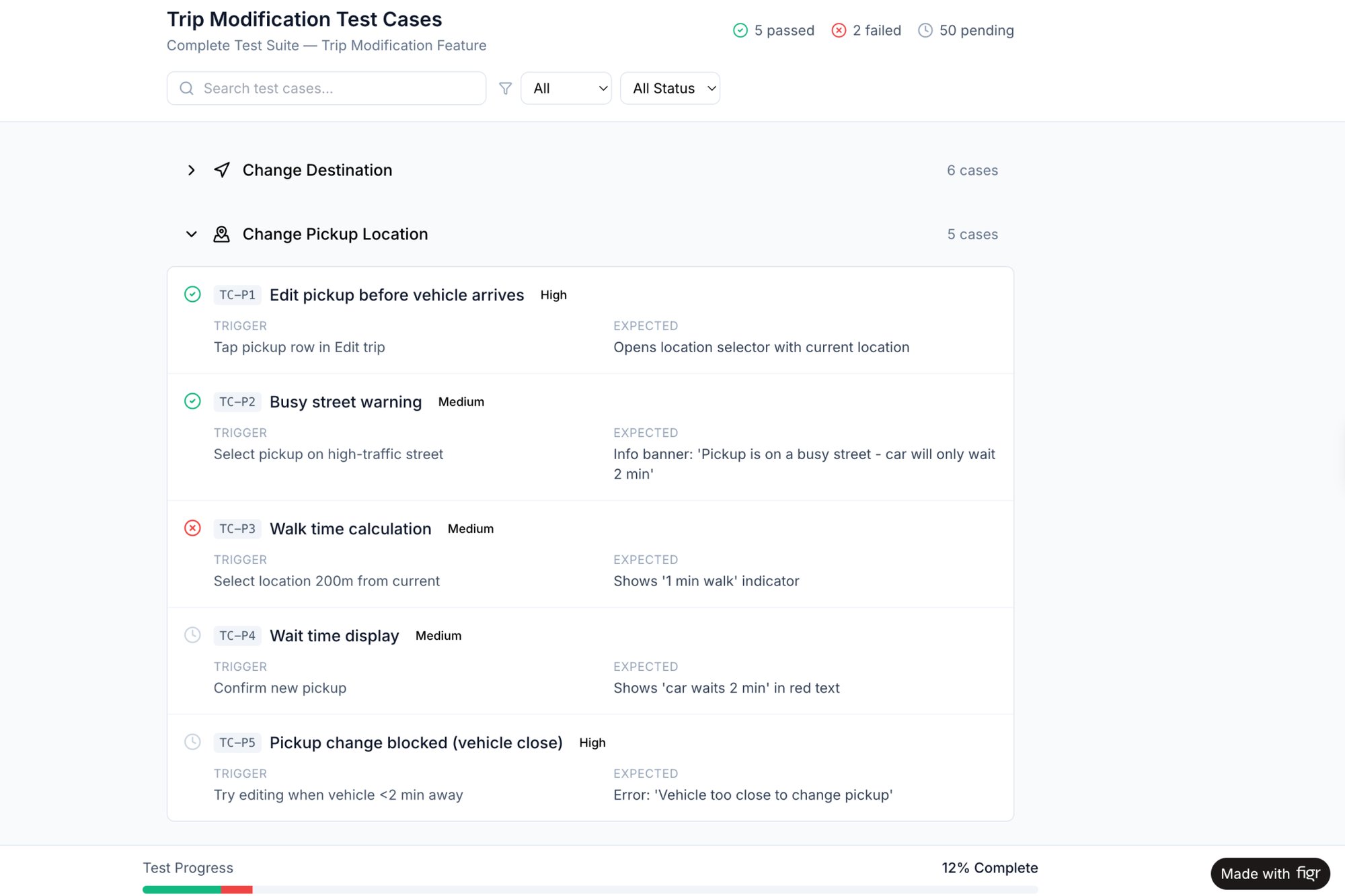
Automate Generation: Use tools to turn design specs and user flows directly into actionable test plans. This ensures QA can start validation immediately, armed with a clear plan like these test cases for a Waymo trip modification feature.
7. Competitive Analysis & Industry Benchmark Integration
A product manager opens a dashboard and sees the new onboarding funnel converts at 22%. Is that good? A junior designer presents a new settings page layout, arguing it's "more modern." Says who? Without external context, product decisions are just opinions floating in a vacuum. Your roadmap becomes a ship sailing without a compass.
This epic is about building that compass. It’s a systematic process for looking outside your own walls to understand where you stand and where you can win. It treats competitive analysis not as a one-off report that gathers dust, but as a continuous input. The goal is to move from reactive imitation to proactive, data-informed strategy.
Why this epic is critical
In a crowded market, ignorance isn't bliss, it's a death sentence. Failing to understand how your product stacks up means you're flying blind. You might be solving a problem your competitor solved better two years ago. This epic establishes a framework for turning raw competitor data into actionable insights. A great starting point is a direct comparison, like this side-by-side analysis of Linear vs Jira, which moves beyond feature lists to evaluate the actual user experience.
Actionable Takeaways
Focus on Jobs, Not Just Features: Don't just make a checklist of what competitors have. Analyze how they solve a specific user job. A competitive analysis of scheduling tools should answer: who gets a user to a live booking link faster?
Benchmark Outcomes, Not Outputs: Instead of counting features, measure what those features achieve. How does your sign-up to activation rate compare to the industry average? What is the benchmark for churn in your vertical?
Systematize the Process: Create a recurring, quarterly competitive review. Assign owners to track 3-5 key competitors. Document findings in a central, accessible location.
Balance with User Research: Competitive analysis tells you what others are building. User research tells you why it matters to your users. Use competitor patterns as hypotheses to test, not as blueprints to copy.
8. Rapid Prototyping & Design Validation Iteration
It's Monday morning. An idea surfaces that gets everyone excited. The team spends a week writing a spec, the designer creates mockups, and engineering starts building two weeks later. Six weeks after that, the feature ships. Only then do you learn from feedback that a core assumption was wrong. An expensive mistake measured in months of effort.
This epic treats product development not as a linear path, but as a series of tight learning loops. The analogy is a movie director storyboarding a scene before filming it. You invest minimally to create a realistic simulation (the prototype) and validate the idea before a single line of production code is written. It de-risks your most valuable resource: engineering time.
Why this epic is critical
In a competitive market, the speed of learning is the primary differentiator. This epic is an engine for that learning. It allows teams to explore multiple design directions and gather high-fidelity feedback when the cost of change is lowest. It's the difference between navigating with a map versus navigating by starlight.
Actionable Takeaways
Define Success First: Before building any prototype, define what you need to learn. Is the user flow intuitive? Write down your validation criteria before you start designing.
Prototype with Real Context: Generic lorem ipsum doesn't yield authentic feedback. Use tools to generate high-fidelity prototypes that mirror your actual product, like building on your existing product context.
Test with a Small, Targeted Group: You don’t need a huge sample size for qualitative validation. As Jakob Nielsen's research shows, testing with just 5-8 users from your target demographic will reveal the majority of usability problems.
Explore Variations: Don't commit to your first idea. When a friend at a Series C company tested a new onboarding flow, their third, "wildcard" prototype outperformed the "safe" option three to one.
Use Prototypes as Specification: A high-fidelity prototype is a dynamic specification. It demonstrates interaction and flow in a way static documents cannot. You can find more advice by reviewing how to choose the right rapid prototyping tools for your needs.
From Sample to System: Making These Epics Your Own
If you zoom out, a pattern emerges. These aren’t just instructions for building features. They are blueprints for building systems that build better features. They force us to move beyond a feature request like “add social login” to a more fundamental question: what is the job this feature is hired to do?
The Hidden Cost of Vague Epics
Why does this systemic approach matter? It's about economics. Vague requirements are the single greatest source of wasted engineering effort. A frequently cited statistic from the Standish Group's ongoing CHAOS report suggests that rework, the effort spent fixing issues caused by unclear specifications, can consume as much as 50% of a project's development cost.
Think about that.
For every two weeks an engineer works, one of those weeks could be spent on work that was entirely avoidable. A well-structured epic is not bureaucratic overhead. It's an economic lever.
The best sample agile epics act as a forcing function for strategic clarity. They demand you define success, anticipate failure, and align the team on the why before a single line of code is written. This shift has given rise to Product Operations, a discipline that exists to create repeatable, scalable processes. The epics we've discussed are the very artifacts Product Ops operationalizes.
From Reading to Doing: Your First Step
The goal of this article isn't for you to copy these epics verbatim. The value is in the adaptation.
In short, do not try to implement everything at once.
Pick one epic from this list that addresses your team's most significant, recurring pain point. Is it scope creep? Unclear success metrics? Surprise edge cases?
Time-box a two-hour session this week to draft a lightweight version for an upcoming initiative.
Use it as a conversation starter, not a final decree. Share the draft with your engineering and design leads.
This process turns the abstract idea of a "better epic" into a concrete artifact you can use to align your team tomorrow. You move from a passive reader of sample agile epics to an active architect of your team's process.
Crafting these strategic documents requires deep thinking. Figr is designed to accelerate this process, handling the tedious discovery and documentation so you can focus on strategy. Instead of spending hours gathering screenshots and mapping flows manually, you can generate a complete user journey analysis or a set of critical edge cases in minutes, turning raw ideas into structured epics ready for your team. You can explore a full working canvas for the Wise Card Freeze flow to see how it works.