
It’s 10 PM. A project manager stares at a screen, her face illuminated by the glow of a half-finished prototype. She feels that familiar knot in her stomach: the quiet fear that after all this work, all the meetings and mockups, the feature might just… miss. That users won’t get it, or worse, won’t care. Before a single line of code is written, that moment of doubt is where great design begins.
This is the invisible work of UI/UX design. It's the craft of translating that doubt into confidence, of turning complex systems into simple, intuitive experiences.
The Moment Before the First Click
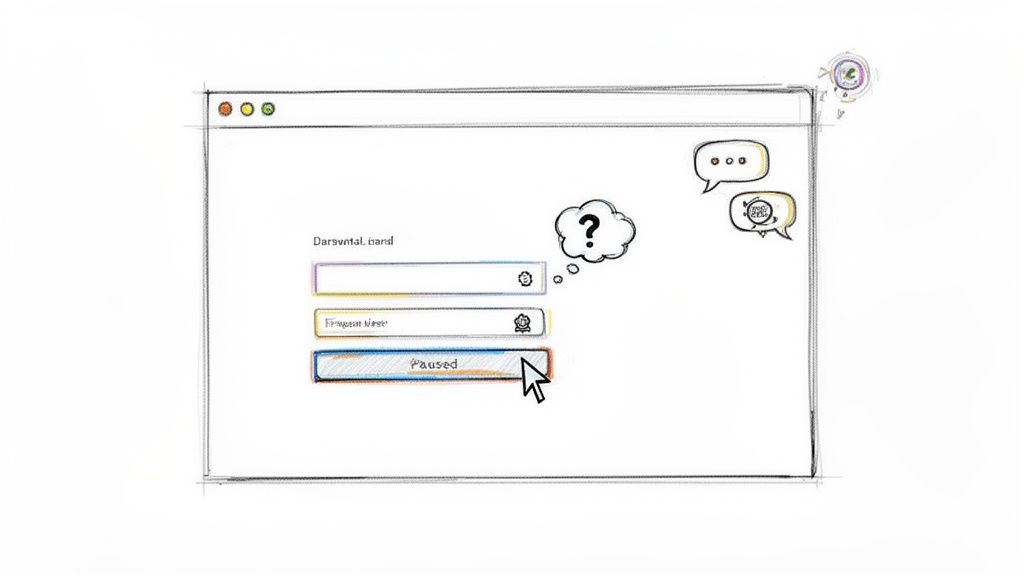
Picture someone landing on a new login page. In that brief moment, their mind races with silent questions. Can I trust this? Is this going to be a pain? Where am I supposed to go?
That tiny pause, the split-second of hesitation before the first click, is where UI/UX does its most important work. This is about so much more than making things look pretty. It’s about answering those unspoken questions with absolute clarity.
This is what I mean: UI/UX design is a conversation between the product and the user. Our job is to make sure that conversation is intuitive, efficient, and maybe even a little enjoyable.
The Architect and The Interior Designer
To really get this, you have to separate the two key roles in this conversation: User Experience (UX) and User Interface (UI). People often lump them together, but they are fundamentally different disciplines, like an architect and an interior designer.
- UX Design is the architect. This is the blueprint. It’s the structural integrity, the flow from the kitchen to the living room, and the overall feeling of the space. Does the layout make sense for the family living there? Is it functional?
- UI Design is the interior designer. This is the paint on the walls, the finish on the doorknobs, and the style of the light fixtures. These are the tangible elements that bring the architect’s vision to life, making the space beautiful and usable.
A house with a perfect blueprint but no doors is uninhabitable. A house with beautiful furniture but a nonsensical layout is a nightmare. You need both working in perfect harmony.
A friend at a Series C company told me recently, “We realized our drop-off wasn’t a feature problem, it was a conversation problem. Our welcome screen just wasn't welcoming.” This is especially true when mapping out a user’s first few moments with a product, like in a well-planned onboarding flow. Great design starts that conversation on the right foot.
A Tale of Two Disciplines: UX vs. UI
Is it one job or two? It’s a common question, and if you're confused, you're not alone. Let's stick with our house analogy to make it clear for good.
If a digital product is a house, then User Experience (UX) design is the architect’s blueprint. It’s the structural integrity, the logical flow between rooms, and that intangible feeling of home. UX answers the big, foundational questions: How many bedrooms do we need? Where should the kitchen go to make cooking feel effortless? Is the foundation solid?
User Interface (UI) design, on the other hand, is the interior decor. It’s the color of the paint, the style of the light fixtures, and the texture of the doorknobs. It’s the tangible surface that makes the architect's vision both beautiful and something you can actually use.
You simply can't have a great house with just one. A flawless blueprint is useless if you can't open the doors. A house filled with beautiful furniture but a nonsensical layout is a source of daily frustration. They are distinct disciplines, yet they are deeply codependent.
The Focus of the Architect (UX)
The UX designer is obsessed with the user’s journey and solving their core problems. Their work is analytical, strategic, and deeply rooted in human psychology. They don’t start with pixels; they start with people.
The core activities of a UX designer are all about answering these foundational questions:
- User Research: Conducting interviews, surveys, and analysis to understand user behaviors, needs, and motivations. This is where the truth lives.
- Persona Creation: Developing fictional, but research-backed, characters that represent the key user types you’re building for.
- Journey Mapping: Visualizing the entire experience a user has with a product, from first awareness to loyal use.
- Wireframing: Creating low-fidelity sketches that map out the structure and function of each screen. This is where you can explore what is a wireframe and see just how crucial this structural step is.
The Craft of the Decorator (UI)
The UI designer takes that structural blueprint from the UX designer and breathes life into it. Their focus is on creating a visually appealing, consistent, and interactive interface. If UX makes a product usable, UI makes it delightful.
The basic gist is this: UI design is the critical handshake between the user and the technology. It's the point where function becomes tangible and a brand finds its visual voice. This work is a blend of artistry and technical precision.
The main responsibilities for a UI designer involve translating the why into the what:
- Visual Design: Defining the entire look and feel, including screen layouts, imagery, and custom icons.
- Color Theory: Creating a color palette that reinforces the brand, guides the user’s eye, and ensures accessibility.
- Typography: Selecting fonts that are not only legible and accessible but also tonally appropriate for the brand.
- Interactivity: Designing how elements like buttons, sliders, and menus look and respond to a user's touch or click.
To see how this partnership works, let’s break down the roles and outputs side-by-side.
UI vs UX Responsibilities and Deliverables
| Aspect | UX Design (The Blueprint) | UI Design (The Interior Decor) |
|---|---|---|
| Main Focus | The overall feel and logic of the experience | The look and feel of the product's surfaces |
| Goal | To solve the user’s problem effectively and logically | To create an aesthetically pleasing and interactive interface |
| Key Questions | Why? What? How? | How does it look? How does it feel to interact with? |
| Deliverables | Personas, Journey Maps, User Flows, Wireframes | Mockups, Prototypes, Style Guides, Design Systems |
| Primary Tools | Research tools, flowchart software, low-fidelity prototyping | Figma, Sketch, Adobe XD, design system managers |
| Measures of Success | Task success rates, user satisfaction, retention | Visual consistency, user engagement, aesthetic appeal |
Ultimately, a successful product doesn't just work well or look good, it does both. This essential partnership in ui/ux design is what turns a good idea into a great product that people love to use.
From Idea to Handoff: The Design Process
Great products don’t just appear. They’re forged through a deliberate process that turns a promising idea into a feature in the hands of users. This is where the real work of ui/ux design happens, a path designed to kill guesswork and challenge assumptions.
I once watched a talented team at a Series C company waste a quarter building a feature nobody wanted. The code was clean, the team was sharp, but they skipped the most critical step: talking to users. That one oversight cost them dearly. It’s a common story, and it’s exactly why this process isn’t optional.
Think of it less like a rigid assembly line and more like a flexible framework.
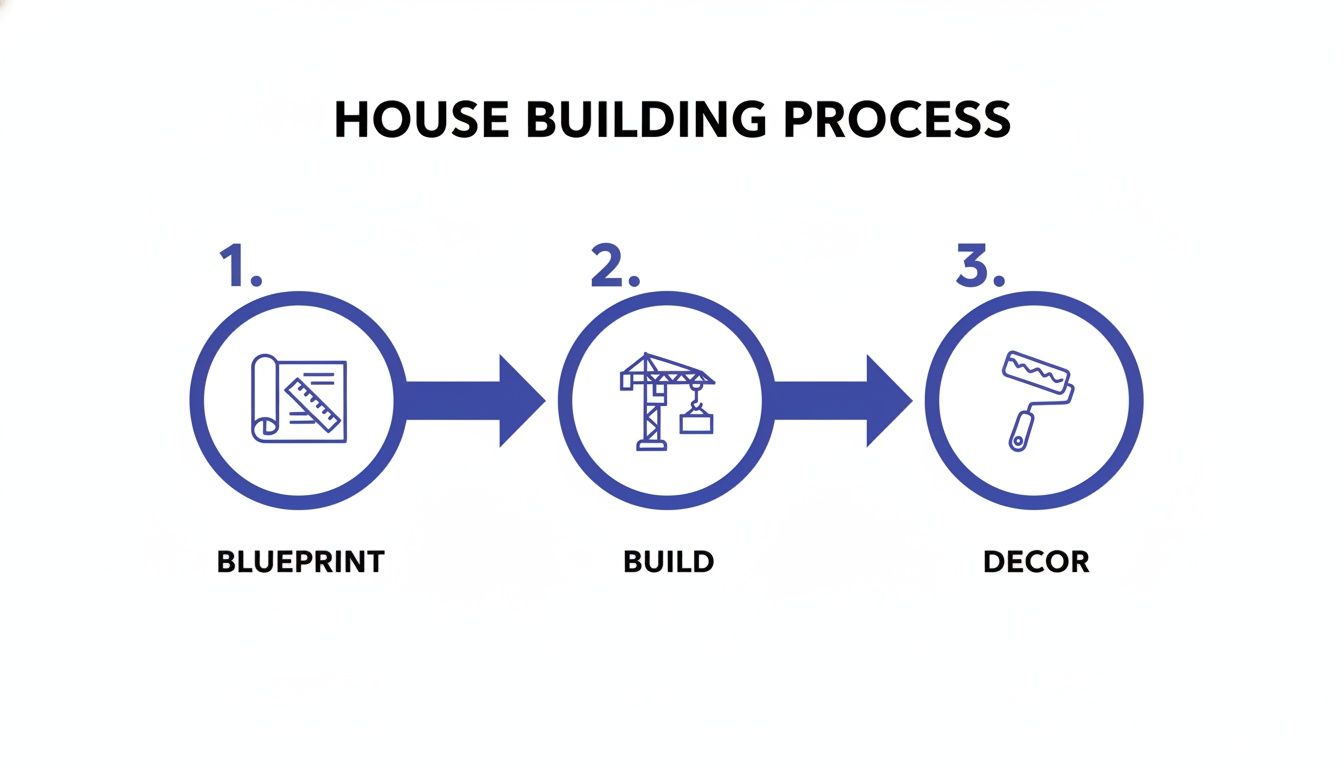
Each phase builds on the last. You wouldn't paint the walls before the foundation is sound, right? Same principle applies here.
Research and Discovery
Every great design starts not with a solution, but with a deep understanding of the problem. This first phase is all about empathy. Who are we building this for? What are their real-world frustrations?
The work here is purely investigative.
- Stakeholder Interviews: Getting everyone aligned on business goals and technical realities.
- User Interviews: Uncovering the pain points and needs straight from your audience.
- Competitive Analysis: Sizing up the market to find opportunities to do it better.
The goal is to emerge with a crystal-clear problem definition. Without this, you’re just building on sand.
Ideation and Wireframing
With a clear problem to solve, the team can finally start exploring solutions. This is a creative, collaborative stage. How might we solve this? What are all the possible ways to structure this experience?
You brainstorm broadly before narrowing your focus. This involves sketching and mapping out user flows. The main output is a wireframe: a low-fidelity, structural blueprint of the interface. It’s all about layout and function, deliberately ignoring visual details like color or fonts.
Prototyping and User Testing
This is where the blueprint comes to life. Wireframes are stitched together into an interactive prototype, a clickable model that feels real enough to test. It’s not meant to be pretty, but it has to be functional. This is the moment of truth.
A prototype’s purpose is not to be perfect; its purpose is to fail quickly and cheaply, so the final product doesn’t.
User testing is simple: you watch real people try to complete tasks with your prototype. Do they get stuck? Are they confused? This feedback loop is where assumptions get shattered and designs get refined.
Testing with just five users can uncover 85% of usability issues, according to a landmark study by the Nielsen Norman Group. This proves the incredible ROI of early validation.
Visual Design and Handoff
Once the user experience is locked in and validated, the UI designer steps in to apply the final polish. This is where the product gets its visual identity, applying the brand's color palette, typography, and iconography to create high-fidelity mockups.
The last step is the handoff. It’s so much more than just sending a Figma link. A smooth handoff requires clear documentation, asset specifications, and a real conversation between designers and engineers. Mastering developer handoff best practices is the final, crucial step to ensure the vision actually ships.
The Pillars of Modern Product Design
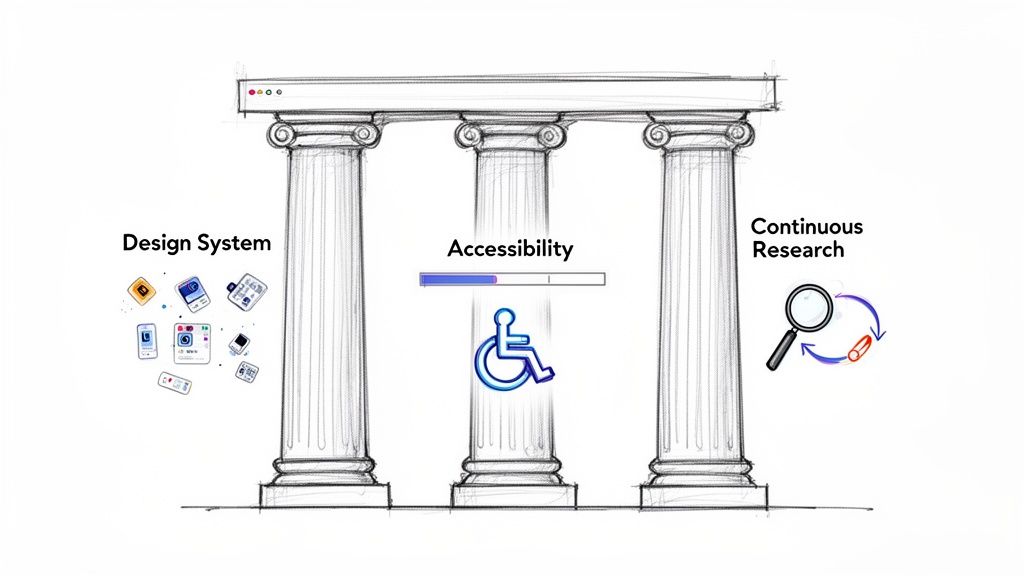
Beyond the process, what really separates a decent product from a great one? It’s not about following a checklist. It's about the principles that guide every decision.
I call them the Three Pillars of Product Integrity: a unified Design System, radical Accessibility, and relentless Research.
These aren't just nice-to-haves. They're the non-negotiable foundations that determine whether a product scales gracefully or collapses under its own weight. Get them wrong, and even the most brilliant ui/ux design ideas are doomed.
Pillar 1: The Source of Truth (Design Systems)
Last week, I watched a PM and an engineer burn an hour debating the exact hex code for a "primary" button. The same button already existed in twelve different places across their app, using three slightly different shades of blue. It’s a painfully common scene.
It's a symptom of a system breakdown.
A design system is the cure for this chaos. It's so much more than a style guide. It's the product's living constitution, the single source of truth for how your product looks, feels, and behaves. It codifies the answers to every reusable design question, from brand colors to complex components.
This pillar delivers two massive advantages:
- Consistency: It creates a predictable, uniform user experience. This builds trust.
- Scale: It massively speeds up development. Teams assemble new features from pre-built blocks instead of reinventing the wheel.
Pillar 2: The Commercial Imperative (Accessibility)
For too long, accessibility has been treated as an afterthought. An edge case. This is a fundamental misunderstanding of its power. Accessibility (often shortened to a11y) isn’t a feature. It's a core design requirement.
Let's look at the economics. Designing for everyone isn’t just a moral imperative, it’s a huge commercial opportunity. By building products that shut out people with disabilities, companies are ignoring a massive segment of the market.
But it goes deeper. An accessible product is simply a better product for everyone. Features like high-contrast text, designed for users with low vision, also help someone using their phone in bright sunlight. Clear, simple language benefits non-native speakers and anyone who's just distracted. Integrating these best practices in user experience (UX) design is essential for building products that serve the widest possible audience.
Pillar 3: The Feedback Engine (Continuous Research)
The third pillar is the engine that saves a product from becoming a fossil: continuous research. A product manager at a fintech company once told me, "We shipped our v1 and thought we were done. By the time we looked up, our users' needs had completely changed." Their product was built on a snapshot in time.
And time, of course, moved on.
Great product teams know that shipping is the starting line, not the finish. Continuous research turns ui/ux design from a project into a perpetual loop of learning. It’s about creating lightweight, regular check-ins with real users to make sure the product stays tethered to their world. This doesn’t mean you need massive budgets or months of planning.
It’s about building a habit of listening. It's about running quick usability tests, watching session recordings, and sending simple feedback surveys. It's about grounding every decision in evidence, not opinion, and mastering core UX design fundamentals.
Measuring What Matters in UI/UX Design
You watch the screen recording of a user trying the new sign-up flow. They hesitate. They click the wrong button. Their cursor circles aimlessly.
Was that a failure? A minor hiccup? Or a sign of a much deeper problem?
This is where the subjective "feel" of design crashes into the hard reality of business. Good ui/ux design isn't just about making things look nice; its impact can and should be measured. You just have to know what to measure. Without data, design feedback is just a collection of opinions.
From Vague Feelings to Hard Metrics
So, how do you put a number on a user’s frustration? You start by focusing on a few core metrics that act as your compass.
Here are the vital signs every product team should track:
- Task Success Rate (TSR): What percentage of users actually complete a specific task? Can people do what you built the feature for?
- Time on Task (ToT): How long does it take a user to get it done? A lower time usually points to a more efficient design.
- System Usability Scale (SUS): A standardized 10-question survey that gives you a quick, reliable score for your product’s overall usability.
- Conversion Rate: What percentage of users take the action you want them to, like signing up or making a purchase? This metric directly connects usability to revenue.
The Zoom-Out Moment: Translating Clicks into Currency
Why does all this matter at scale? Because small design improvements create huge business leverage. A 2% improvement in your conversion rate isn't just a small win for the design team. For a large company, that can translate into millions of dollars in new revenue. This is the Return on Design Investment, and it’s how you get a seat at the table.
The numbers are staggering. Research from Forrester reveals that every $1 invested in UX can yield a $100 return, a 9,900% ROI. What’s more, a well-thought-out UX strategy can boost conversion rates by up to 400%. When you start talking in these terms, the entire conversation changes. Design shifts from being seen as a cost center to being recognized as a core engine for business success. Learn more about the business impact of user experience design.
A Grounded Takeaway
The takeaway here is to start small, but start now. You don't need a complex analytics setup to begin.
Pick one critical user flow. It could be upgrading an account or inviting a teammate. Establish a baseline for one or two key metrics. Then, design an alternative and test it.
By comparing the performance of the new design against the original, you can prove its value with hard data, not just good intentions.
Your Next Step: From Theory to Action
We've covered a lot of ground, from the silent questions a user has to the hard metrics that prove a design’s worth. But theory is just trivia until you put it into practice.
So, what's the single most important thing you can do now?
It’s simple: ground your very next design decision in real-world context.
Don't start with a blank canvas in Figma. That’s how you build something nobody asked for. The first step toward better ui/ux design isn’t some grand reinvention. It’s a focused observation.
The Power of One
This isn't about overhauling your entire product. It's about finding one point of friction and fixing it with evidence.
There’s a better path.
It's smaller, faster, and a whole lot smarter.
You need a tangible starting point. Here’s how you find one:
- Capture Your Current Reality: Use a tool to document one critical user flow in your app as it exists today. This could be your onboarding sequence or checkout process.
- Identify One Point of Friction: Stare at that flow. Where do users get stuck? What step feels clunky? Find just one weak link.
- Generate One Clear Variation: Propose a single, focused change for that point of friction with a clear hypothesis explaining why it will make things better.
This approach shifts your team's energy from abstract debates to concrete, measurable progress.
The Future of the Craft
Getting good at this iterative, evidence-based workflow is more critical than ever. The UX profession is projected to explode to 100 million people by 2050, a staggering 100-fold increase from 2017.
This isn’t just a random trend. This growth shows just how central design has become to modern business. You can learn more about the history and future of UX from the Nielsen Norman Group's research.
In short, the most effective teams are the ones who can iterate the fastest based on real evidence. By focusing on one small, data-informed change at a time, you build momentum. You build confidence. And most importantly, you ship better products.
Your next step isn’t a giant leap.
It’s a single, well-placed move.
Frequently Asked Questions About UI/UX
We’ve walked through the principles and processes of modern UI/UX design. Now, let’s get into the questions I hear all the time from product managers, engineers, and founders.
What Is the Main Difference Between a UI and UX Designer?
Think back to our house analogy. It’s the clearest way to see the distinction.
The UX designer is the architect. They're obsessed with the blueprint, the flow, and the fundamental structure. Does this house actually work for the family living in it?
The UI designer is the interior decorator. They take the architect's solid blueprint and bring it to life, focusing on every surface the user touches: the screens, buttons, and visual elements.
How Can We Integrate Design into Agile Sprints?
This is a classic point of friction. The best solution I've found is a dual-track agile process. The core idea is simple: design and development run on parallel tracks.
The design team works one or two sprints ahead of the development team.
In this model, designers conduct research, explore concepts, and deliver validated designs. Those designs become a backlog of ready-to-build user stories for engineering. This prevents the all-too-common bottleneck where developers are waiting on design.
How Much User Research Is Enough?
So many teams get stuck here. They imagine research as a massive, six-month academic study and get paralyzed. That's a myth. The key isn't to do one big research project; it's to build a small, continuous research habit.
The renowned Nielsen Norman Group famously found that testing with as few as five users can uncover about 85% of the usability problems in a flow.
The goal isn't perfection. It's about creating a constant feedback loop. Find the big issues, fix them, and test again. Rapid learning will always beat waiting for absolute certainty.
Ready to ground your next design decision in real product context instead of guesswork? Figr is an AI design agent that learns your live app, surfaces proven patterns, and generates high-fidelity flows that mirror your existing product. Stop starting from scratch and start shipping faster. Explore how to build confidently at https://figr.design.
