

At 5:42 p.m., the deal flips to Won in Pipedrive. Sales posts the screenshot. Someone drops confetti in Slack. Then the quieter message arrives in the product channel: what exactly did we just commit to?
That moment has a smell to it. Half celebration, half smoke.
I’ve seen strong teams lose weeks in that gap, not because anyone was careless, but because the system between promise and execution was thin. The CRM knew the commercial truth. The delivery team needed the operational truth. Those are not the same thing.
The asana pipedrive integration matters because it can close that gap. But only if you treat it as more than a convenience feature. Used well, it becomes what I think of as the Operational Flywheel, a loop where deal context turns into executable work, execution status creates accountability, and what delivery learns feeds back into better sales judgment.
The Handoff Chasm Between Sales and Product
A lot of product chaos starts with a clean sales outcome.
The deal is real. The revenue is real. The customer is excited. But the implementation artifact is thin, usually a title, a few notes, maybe an attachment if someone remembered. The team receiving the work has to reconstruct intent from fragments.
That gap is what I call the Handoff Chasm.

I watched this play out recently through a friend at a Series C company. Sales closed a strategic account and marked the deal as ready for onboarding. Product and engineering got a hurried brief, built around what they thought was the core requirement, and only later learned the customer had bought for a different use case. Nobody lied. Nobody intentionally hid context. The handoff depended on memory, screenshots, and scattered notes.
That’s not a communication issue alone. It’s a systems issue.
Why the chasm keeps showing up
The basic gist is this: sales teams optimize for movement through the pipeline, while product and engineering optimize for clarity before commitment. When those incentives meet without structure, friction appears fast.
A handoff fails when any of these are true:
- The trigger is late, so delivery only learns about a deal after commercial terms are already fixed.
- The payload is shallow, so the receiving team gets a task without the context needed to act.
- Ownership is fuzzy, so everyone assumes someone else will fill in the blanks.
- Progress is invisible, so sales keeps talking to the customer without knowing what implementation has validated.
According to the Asana integration documentation, the Pipedrive integration can trigger task or project creation when deals are won, lost, or moved to selected stages, with configurations that work across one or multiple pipelines. That matters because handoff quality improves the moment it becomes a repeatable operational event instead of a heroic one-off.
Practical rule: If a customer promise depends on somebody “remembering to tell the team,” you do not have a process. You have a hope.
The Operational Flywheel
The fix isn’t just “send a task to Asana.” That’s too narrow.
A stronger model looks like this:
- Sales moves the deal in Pipedrive.
- The integration creates structured work in Asana.
- Delivery teams execute against a shared template with the right context attached.
- Status becomes visible, which gives sales better ground truth for customer conversations.
- That feedback changes future deal behavior, tightening qualification and scoping over time.
That’s the flywheel. Not just transfer, but learning.
For teams improving developer handoff best practices, the integration proves its value. It makes the sales-to-product boundary less improvisational. It also reduces the cultural tax that builds up when engineers feel they’re always discovering commitments after the fact.
And yes, this matters at scale. Once a company grows past founder-led selling, nobody can personally interpret every deal. Systems start carrying trust between teams. If the system is noisy, trust erodes. If the system is clear, execution compounds.
Choosing Your Integration Architecture
A deal closes on Friday. Sales marks it won, the customer expects kickoff on Monday, and by Tuesday the product team is still asking basic questions in Slack. That failure usually gets blamed on execution. In practice, the architecture was wrong from the start.
The decision is not whether Asana can connect to Pipedrive. It can. The decision is how much operational truth needs to survive the handoff, and who needs to trust that truth afterward.
That distinction matters because the right architecture feeds the operational flywheel. Pipedrive captures commercial intent. Asana turns that intent into assigned work, visible owners, and actual progress. Then the output needs to travel back, either through data or through process, so sales can stop making promises based on stale assumptions. If your setup only creates tasks, you have a trigger. If it improves qualification, scoping, and roadmap judgment over time, you have a system.
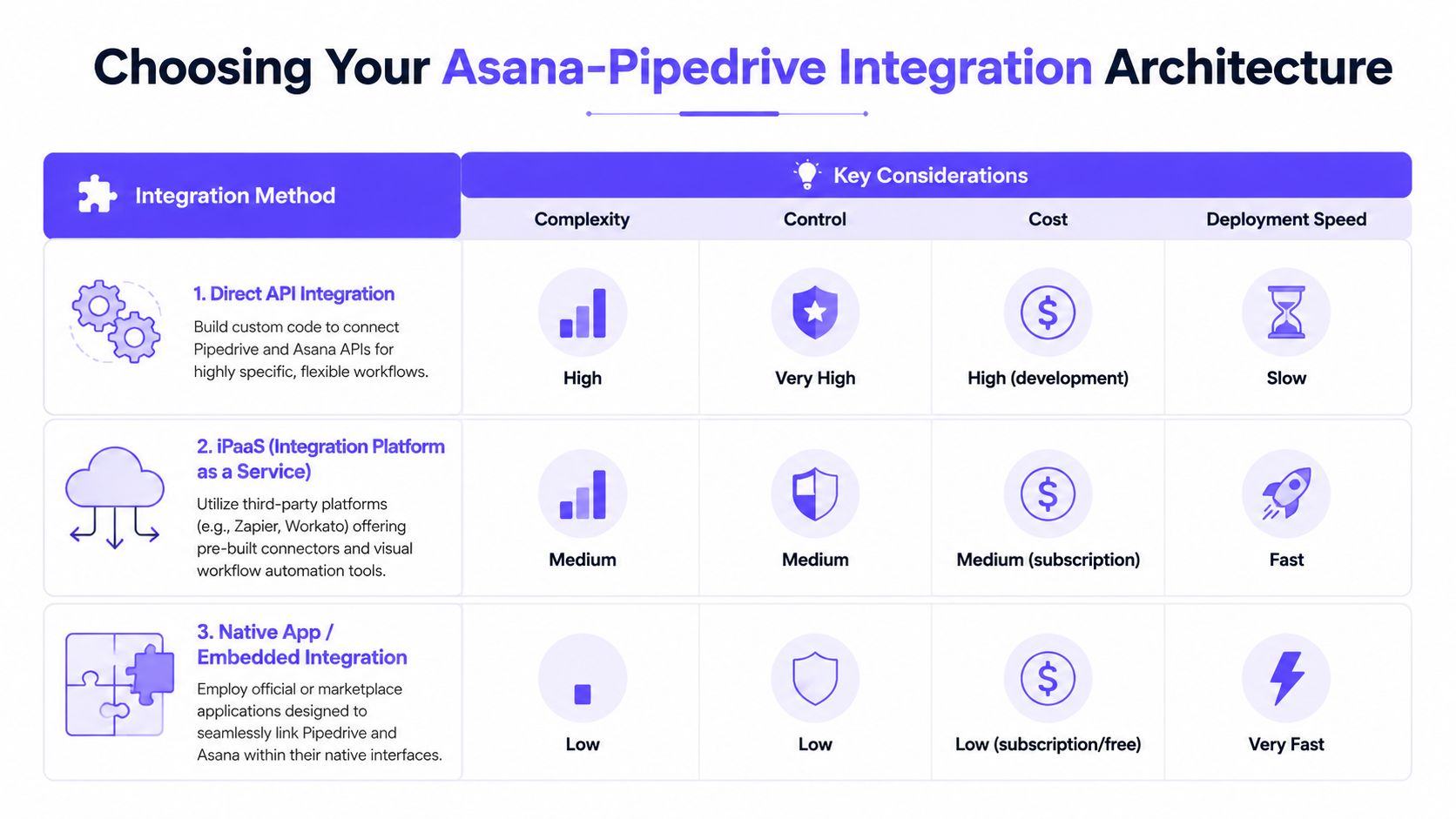
Native connector for stable, low-variance workflows
The native route fits teams with a narrow handoff pattern and low process variance. One deal stage triggers one project or task pattern in Asana. Ownership is clear. Exceptions are rare.
Use it when:
- Your sales process is consistent, and the same stage should always create the same kind of delivery work
- One-way movement is acceptable, because product or implementation status does not need to update CRM behavior directly
- You need low admin overhead, with minimal maintenance and fewer failure points
This option is fast to launch and easy to explain.
It also has a ceiling. Once different customer segments need different onboarding paths, approval steps, or implementation templates, the native setup starts forcing people back into manual triage. I have seen teams cling to a simple connector six months too long because the first version worked for 80 percent of deals. The remaining 20 percent created operational cost.
Middleware for conditional logic and controlled scale
Middleware is usually the best fit for product-led operations teams that have graduated from basic handoffs but do not want to own a custom service. Tools like Zapier or Make let ops teams encode commercial nuance without waiting on engineering for every rule change.
That matters when deal reality is messy. Enterprise accounts may require security review. Services deals may need an implementation template. Expansion deals may need customer success involved but not product. Middleware handles those branches well if the logic is documented and someone owns it.
I recommend this path when the handoff needs judgment baked into it, but not full platform engineering. It is also a practical choice for companies already standardizing cross-functional systems and evaluating adjacent tools for marketing workflows. The same trade-off applies here. Faster automation is useful only if somebody can maintain the rule set once exceptions pile up.
A warning. Middleware fails slowly. You do not notice the problem when the first automation goes live. You notice it after twelve special-case paths, three duplicate fields, and one departed ops manager who was the only person who understood why the filters were written that way.
Custom API sync for teams that need feedback loops, not just triggers
Custom API work is justified when the integration itself becomes part of your operating model.
That usually means more than passing a deal into Asana. It means writing status back into Pipedrive, shaping payloads by business model, logging every state change, and controlling permissions at a level no off-the-shelf connector will give you. It also means using delivery outcomes to validate what sales sold in the first place.
Good reasons to build it include:
- Bidirectional workflow requirements, where milestones, blockers, or launch status in Asana should influence CRM actions
- Strict compliance or audit needs, where payload control, logging, and access policies matter
- Complex routing rules, such as assignment by region, product line, implementation tier, or contract type
- Roadmap signal capture, where repeated implementation friction needs to be visible back to product leadership
This is the architecture that best supports the operational flywheel. It creates accountability in both directions. Sales can see what happened after the close. Product can see what was promised before the work started. Leadership gets a cleaner view of whether recurring customer asks belong in onboarding, support, or the roadmap.
The trade-off is ownership. A custom integration is not a one-time project. It is a product surface. APIs change, fields drift, edge cases multiply, and someone has to test all of it.
A practical decision filter
Choose based on exception volume, feedback requirements, and your appetite for maintenance.
| Question | Native connector | Middleware | Custom API |
|---|---|---|---|
| How many exception paths do we have? | Few | Several | Many |
| Do we need conditional project creation? | Limited | Yes | Yes |
| Do we need delivery data flowing back? | No | Sometimes | Yes |
| Can we support ongoing maintenance? | Minimal | Moderate | High |
One more hard-earned lesson. Architecture choices get distorted when the underlying data is inconsistent. If your teams use different naming conventions, optional fields, or conflicting ownership rules, the integration will preserve that confusion at machine speed. Clean up structure before adding complexity. The same discipline applies when teams optimize product data migration for faster UX. Clean inputs produce reliable automation. Messy inputs produce reliable chaos.
Designing Your Data Flow with Smart Field Mapping
The biggest mistake in an asana pipedrive integration is assuming the job is done once records move from one tool to another.
It isn’t.
The job is designing what I call the Context Packet, the smallest complete bundle of information that lets a product, engineering, or implementation team act without chasing the salesperson for missing context. If the task lands in Asana and still triggers five follow-up messages, the automation only moved the interruption.
Build the Context Packet first
A useful Context Packet is opinionated. It doesn’t dump everything from Pipedrive into Asana. It sends what the receiving team needs to make the next decision.
The MinorCo integration analysis makes this point in a practical way: implementation success correlates with automation rule completeness, and teams with 5+ distinct trigger rules report a 40-60% reduction in duplicate data entry across systems. The same source also notes that the Asana task description field should be configured to include deal data and custom metadata at the point of execution.
That should change how you think about mapping. Don’t map for storage. Map for action.
Here’s an example structure that works well for product and delivery teams.
Example field mapping from Pipedrive to Asana
| Pipedrive Field | Asana Field | Rationale |
|---|---|---|
| Deal title | Project name or task title | Gives the receiving team a stable reference tied to the customer or opportunity |
| Deal stage | Custom field or section placement | Signals whether this is kickoff, review, scoping, or post-sale work |
| Deal notes | Project brief or task description | Preserves commercial nuance that won’t fit in a title |
| Organization or contact | Custom field | Helps implementation, support, and product know who the user or buyer is |
| Expected close context | Due date or planning note | Useful when teams are preparing before closure rather than after |
| Requested feature | Dedicated task in a feedback project | Keeps product feedback separate from delivery work |
| Custom implementation details | Task description template | Embeds constraints, dependencies, and customer-specific requirements |
| Owner in Pipedrive | Assignee or collaborator | Prevents orphaned tasks and makes follow-up explicit |
A lot of teams over-map on the first pass. They move every field because they can. Then Asana becomes a CRM mirror instead of a work system.
That usually fails adoption.
What good mapping feels like in practice
When a delivery lead opens an Asana project created from Pipedrive, they should immediately see:
- Who bought
- What was sold
- What matters first
- What constraints already exist
- Who to ask when ambiguity appears
If any of those are missing, the handoff is incomplete.
This is what I mean by designing for downstream cognition. You’re not just connecting objects in software. You’re reducing the number of decisions the receiving team has to reconstruct. That lowers delay, and it lowers resentment too.
A handoff becomes reliable when the receiving team can start from context instead of detective work.
The incentive alignment most teams ignore
Here’s the zoom-out moment. Sales is rewarded for closing. Product is rewarded for shipping the right thing. Implementation is rewarded for getting the customer live without chaos. Those incentives don’t naturally align through goodwill alone. They align through information design.
A strong field map turns conflict into collaboration because it changes the default behavior. Sales no longer has to remember every detail in a live chat. Product no longer has to interrogate every won deal. The system carries the minimum necessary truth across the boundary.
If you’re sketching this out with your operations or product ops team, it helps to document the workflow visually before touching the automation builder. A few simple flowchart process examples can expose where context is created, who owns it, and where the payload should branch.
One warning from experience: don’t put roadmap decisions directly inside a sales-triggered implementation project. Keep “deliver what was sold” separate from “evaluate what should become product.” The integration can feed both, but those are different decisions with different owners.
Three Essential Automation Recipes for Product Teams
Once the field mapping is stable, the next move is building automations that solve real coordination problems, not just administrative ones.
That’s where many teams stop too early. They automate the obvious handoff and miss the more valuable workflows around risk, validation, and learning.

The Pipedrive Asana integration page notes that implementing organizations track improved follow-up consistency for 100% of deals, and that the setup enables cross-functional coordination by automatically notifying and assigning teams like Accounts, Legal, and Customer Success at critical deal stages. That’s the important clue. The integration is most useful when it orchestrates a team response, not just task creation.
Won deal to templated kickoff project
This is the foundational recipe.
Trigger: A deal is marked won, or reaches the final pre-delivery stage if your team wants preparation before closure.
Action: Create an Asana project from a standard kickoff template, pre-fill the brief with the Context Packet, assign a project owner, and add collaborators from implementation, support, or customer success.
Why it works: It turns a commercial event into a structured operational beginning. No one has to remember which checklist to use. No one is hunting for the latest onboarding template. The team starts from a known shape.
What separates a strong version from a weak one? The template itself. Include discovery tasks, dependency checks, customer goals, risk notes, and internal approvals. Don’t create a blank project and call it automation.
At-risk deal to technical review
This recipe catches over-promising before it becomes rework.
Trigger: A deal enters a stage like scoping, negotiation, or a custom stage where technical complexity appears.
Action: Create a high-priority Asana task for a solutions engineer, product manager, or technical lead. Include deal notes, requested capabilities, and any timeline assumptions made during the sales conversation.
Why it works: It creates a checkpoint while there’s still room to adjust expectations. That matters more than a polished post-sale handoff because the cheapest promise to fix is the one you haven’t made yet.
I’ve found this is often the most impactful automation for product teams in B2B SaaS. It reduces the number of roadmap distortions caused by one large deal with poorly validated asks.
Field note: If your team only automates “won deal” events, you’re acting after commitment. Some of the best value comes from stage-based visibility before commitment hardens.
A quick walkthrough can help if you’re shaping the workflow in a builder or reviewing setup patterns with RevOps.
Feature request to roadmap input
The Operational Flywheel starts becoming visible at this point.
Trigger: A salesperson logs a requested feature, missing capability, or workaround concern in a Pipedrive custom field.
Action: Create a categorized task in a dedicated Asana project for product feedback. Tag it by segment, opportunity type, or product area. Include deal context in the task description, but do not route it into the implementation project by default.
Why it works: It preserves commercial signal without pretending every request is a commitment. Product gets a clean intake stream tied to real demand. Sales gets a place for customer asks to live without hiding them in notes.
This distinction matters. Customer-specific delivery work belongs in one system of execution. Market learning belongs in another system of prioritization. The integration can feed both, but not if you collapse them into the same queue.
If your product org later needs these feedback items converted into engineering work, tools like Figr's AI Jira ticket generators are useful in the next stage, once the input has been qualified and framed well.
The trade-off behind every recipe
Every automation recipe makes one choice for you: when the system should assume enough certainty to create work.
That’s the trade-off.
Automate too early, and you flood Asana with noise. Automate too late, and people improvise in Slack and email until context decays. The best teams choose trigger points where confidence is high enough to act, but early enough to shape the outcome.
Governance Security and Troubleshooting Your Integration
An integration is never “done.” It either has an owner, or it slowly becomes folklore.
That’s especially true once the workflow starts carrying sensitive deal information into Asana. Commercial notes, attachments, customer names, and implementation details don’t all belong in the same level of visibility. Some teams discover this only after a broad workspace rollout exposes information far beyond the intended group.
Governance is what keeps automation from becoming clutter
The official marketplace view makes the limitation clear in another way. Pipedrive’s marketplace listing for Asana shows that while Pipedrive offers four pre-made automation templates, there is minimal guidance for complex multi-stage workflows, and users want more deal-specific logic such as mapping custom fields to Asana task properties or syncing milestone completion back into Pipedrive. In practice, that means teams often build extra logic around the defaults, and that’s where governance starts to matter.
Harvard Business Review has long argued that digital systems fail less from missing technology than from weak management discipline. That principle applies here. The automations themselves are usually the easy part. The hard part is deciding who can create rules, who can change them, which fields are allowed to sync, and what should happen when business processes change.
A simple governance model usually includes:
- One named system owner, often in RevOps, Product Ops, or BizOps
- A change log, so rule edits aren’t invisible
- Field-level decisions, especially for notes, attachments, and customer-sensitive data
- Access boundaries, so only the right Asana teams see the right projects
- Quarterly review, where outdated automations are retired before they generate noise
If nobody can answer “who owns this automation” in one sentence, the integration already has a reliability problem.
Security decisions teams should make upfront
Security isn’t only about authentication. It’s about exposure.
Ask these questions before rollout:
- Should every won deal create a visible project, or only deals in certain segments?
- Are pinned notes or attachments safe to sync by default?
- Do legal, support, and product need the same level of customer context?
- What happens when a deal changes direction after the Asana work has already started?
For teams working through broader concerns around artifacts and shared access, the same thinking used in prototype intellectual property protection applies here too. Share the minimum useful context, not the maximum available context.
A practical troubleshooting checklist
When an asana pipedrive integration starts behaving strangely, the issue usually falls into one of a few buckets:
Trigger mismatch
The deal moved, but not through the stage the rule watches.Field drift
Someone renamed a field, changed a stage, or altered a template assumption.Duplicate creation
Multiple automations are listening for closely related events.Permission failure
The automation can fire, but the destination project, workspace, or user assignment is no longer valid.Process drift
Sales changed how they qualify or progress deals, but the automation still reflects the old operating model.
The fastest diagnosis starts with the event history. Check whether the trigger fired, inspect the payload, then verify whether the destination in Asana still exists in the expected form. Most failures aren’t mysterious. They’re usually stale assumptions made visible.
Conclusion From Connection to Intelligence
The best asana pipedrive integration setups don’t feel flashy. They feel calm.
A deal moves forward, and the right people know what to do. The Asana project appears with enough context to begin. Product sees what was sold. Implementation sees what matters first. Sales sees progress without asking for a status recap in six different places.
That’s why I think the true value isn’t connection. It’s intelligence.
The Operational Flywheel starts with a handoff, but it doesn’t end there. It creates a loop where sales signals become structured execution, execution produces clearer visibility, and that visibility improves future selling. Over time, the business gets better at knowing which promises it can keep, which requests belong in the roadmap, and where friction keeps reappearing.
A clean system does something subtle but important. It reduces interpretation debt. People no longer spend their energy reconstructing what a deal meant. They can spend that energy on delivery, prioritization, and customer judgment.
In short, the point of the integration is not to move data faster. It’s to turn customer commitments into accountable work with less ambiguity and better feedback.
If you want a grounded first move, keep it small. This week, implement one automation only: Won Deal to Templated Kickoff Project. Pick one pipeline. Define the Context Packet. Watch one deal travel from Pipedrive into Asana. Then sit with the receiving team and ask a hard question: did this save them follow-up, or did it just create another notification?
That answer will tell you what to build next.
If your team wants to turn messy product context into production-ready workflows, Figr is worth a look. It helps product teams generate flows, PRDs, edge cases, UX reviews, prototypes, and handoff-ready artifacts grounded in your live product, so execution starts with context instead of guesswork.
